【Qt】Qt Http 下载(转载)

文章目录
  1. 1. QT之HTTP请求下载
  • 简述
  • 代码之路
    1. 0.1. 效果:
  • 1. 1、DOWNLOADMANAGER
  • 2. 2、MYHTTPDOWNLOAD
    1. 2.1. 标注: 代码注释中提到可以根据URL来获取文件名,下方给予解释说明。
  • QT之HTTP请求下载

    标签: Qt HTTP

    简述

    最近在研究了一下用Qt 的方法来实现http下载,Qt 中的Http请求主要用到了QNetworkAccessManagerQNetworkReplyQNetworkRequest 这三块。本篇文章主要叙述如何用Qt 的方法进行HTTP 请求下载文件,能够支持****断点续传****(断点续传即能够手动停止下载,下次可以从已经下载的部分开始继续下载未完成的部分,而没有必要从头开始上传下载),并且实时更新下载信息。整体代码考虑十分周到,对各种情况也做了相应的处理,并且有通俗易懂的注释。好了,代码走起!

    代码之路

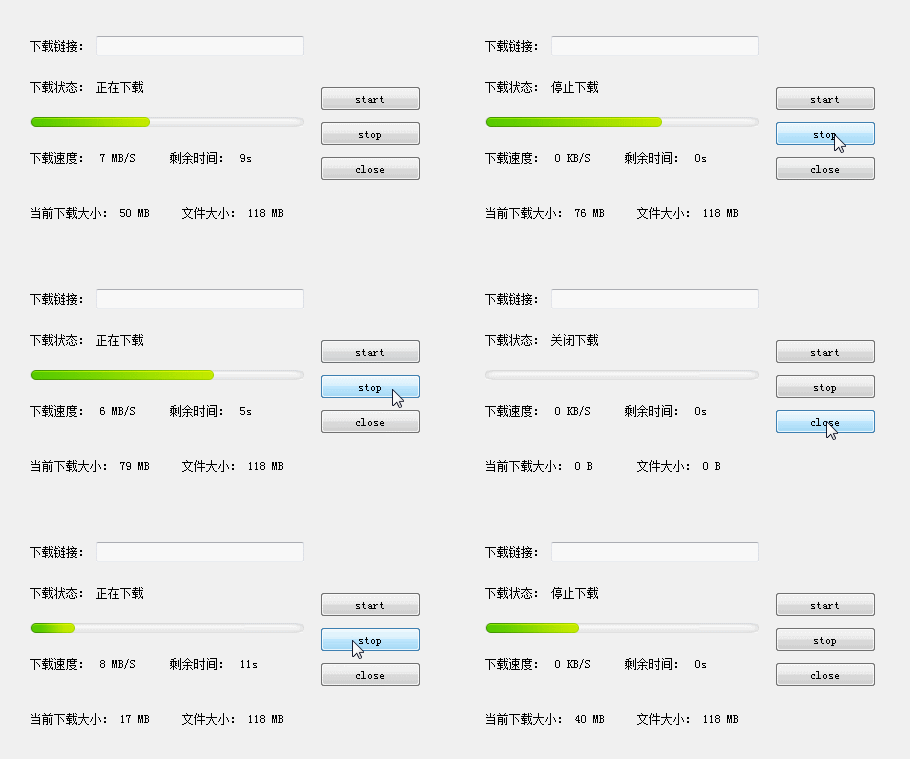
    在讲解代码之前先看一下效果图:

    效果:

    从图中可以看出点击start按钮,进行下载,stop按钮暂停当前下载,close按钮停止当前下载,并删除已经下载的临时文件,并将所有参数重置, 这里界面中下载链接输入框为空是因为我在代码中默认了url,也可以在输入框中输入url进行下载。


    代码主要包含两个部分:

    1、DownLoadManager : 用来请求下载,向界面传递下载信息,并将下载的内容保存到文件中

    2、MyHttpDownload : 用来接收下载链接,利用DownLoadManager进行下载,更新界面,并对当前下载进行操作(包括:开始、暂停、停止下载)。

    1、DOWNLOADMANAGER

    1
    2
    3
    4
    5
    6
    7
    8
    9
    10
    11
    12
    13
    14
    15
    16
    17
    18
    19
    20
    21
    22
    23
    24
    25
    26
    27
    28
    29
    30
    31
    32
    33
    34
    35
    36
    37
    38
    39
    40
    41
    42
    43
    44
    45
    46
    47
    48
    49
    50
    51
    52
    53
    54
    55
    56
    57
    58
    59
    60
    61
    62
    63
    64
    65
    66
    67
    68
    69
    70
    71
    72
    73
    74
    75
    76
    77
    78
    79
    80
    81
    82
    83
    84
    85
    86
    87
    88
    89
    90
    91
    92
    93
    94
    95
    96
    97
    98
    99
    100
    101
    102
    103
    104
    105
    106
    107
    108
    109
    110
    111
    112
    113
    114
    115
    116
    117
    118
    119
    120
    121
    122
    123
    124
    125
    126
    127
    128
    129
    130
    131
    132
    133
    134
    135
    136
    137
    138
    139
    140
    141
    142
    143
    144
    145
    146
    147
    148
    149
    150
    151
    152
    153
    154
    155
    156
    157
    158
    159
    160
    161
    162
    163
    164
    165
    166
    167
    168
    169
    170
    171
    172
    173
    174
    175
    176
    177
    178
    179
    180
    181
    182
    183
    184
    185
    186
    187
    188
    189
    190
    191
    192
    193
    194
    195
    196
    197
    #include "downloadmanager.h"
    #include <QFile>
    #include <QDebug>
    #include <QFileInfo>
    #include <QDir>

    #define DOWNLOAD_FILE_SUFFIX "_tmp"

    DownLoadManager::DownLoadManager(QObject *parent)
    : QObject(parent)
    , m_networkManager(NULL)
    , m_url(QUrl(""))
    , m_fileName("")
    , m_isSupportBreakPoint(false)
    , m_bytesReceived(0)
    , m_bytesTotal(0)
    , m_bytesCurrentReceived(0)
    , m_isStop(true)
    {
    m_networkManager = new QNetworkAccessManager(this);
    }

    DownLoadManager::~DownLoadManager()
    {}

    // 设置是否支持断点续传;
    void DownLoadManager::setDownInto(bool isSupportBreakPoint)
    {
    m_isSupportBreakPoint = isSupportBreakPoint;
    }

    // 获取当前下载链接;
    QString DownLoadManager::getDownloadUrl()
    {
    return m_url.toString();
    }

    // 开始下载文件,传入下载链接和文件的路径;
    void DownLoadManager::downloadFile(QString url , QString fileName)
    {
    // 防止多次点击开始下载按钮,进行多次下载,只有在停止标志变量为true时才进行下载;
    if (m_isStop)
    {
    m_isStop = false;
    m_url = QUrl(url);

    // 这里可用从url中获取文件名,但不是对所有的url都有效;
    // QString fileName = m_url.fileName();

    // 将当前文件名设置为临时文件名,下载完成时修改回来;
    m_fileName = fileName + DOWNLOAD_FILE_SUFFIX;

    // 如果当前下载的字节数为0那么说明未下载过或者重新下载
    // 则需要检测本地是否存在之前下载的临时文件,如果有则删除
    if (m_bytesCurrentReceived <= 0)
    {
    removeFile(m_fileName);
    }

    QNetworkRequest request;
    request.setUrl(m_url);

    // 如果支持断点续传,则设置请求头信息
    if (m_isSupportBreakPoint)
    {
    QString strRange = QString("bytes=%1-").arg(m_bytesCurrentReceived);
    request.setRawHeader("Range", strRange.toLatin1());
    }

    // 请求下载;
    m_reply = m_networkManager->get(request);

    connect(m_reply, SIGNAL(downloadProgress(qint64, qint64)), this, SLOT(onDownloadProgress(qint64, qint64)));
    connect(m_reply, SIGNAL(readyRead()), this, SLOT(onReadyRead()));
    connect(m_reply, SIGNAL(finished()), this, SLOT(onFinished()));
    connect(m_reply, SIGNAL(error(QNetworkReply::NetworkError)), this, SLOT(onError(QNetworkReply::NetworkError)));
    }
    }

    // 下载进度信息;
    void DownLoadManager::onDownloadProgress(qint64 bytesReceived, qint64 bytesTotal)
    {
    if (!m_isStop)
    {
    m_bytesReceived = bytesReceived;
    m_bytesTotal = bytesTotal;
    // 更新下载进度;(加上 m_bytesCurrentReceived 是为了断点续传时之前下载的字节)
    emit signalDownloadProcess(m_bytesReceived + m_bytesCurrentReceived, m_bytesTotal + m_bytesCurrentReceived);
    }
    }

    // 获取下载内容,保存到文件中;
    void DownLoadManager::onReadyRead()
    {
    if (!m_isStop)
    {
    QFile file(m_fileName);
    if (file.open(QIODevice::WriteOnly | QIODevice::Append))
    {
    file.write(m_reply->readAll());
    }
    file.close();
    }
    }

    // 下载完成;
    void DownLoadManager::onFinished()
    {
    m_isStop = true;
    // http请求状态码;
    QVariant statusCode = m_reply->attribute(QNetworkRequest::HttpStatusCodeAttribute);

    if (m_reply->error() == QNetworkReply::NoError)
    {
    // 重命名临时文件;
    QFileInfo fileInfo(m_fileName);
    if (fileInfo.exists())
    {
    int index = m_fileName.lastIndexOf(DOWNLOAD_FILE_SUFFIX);
    QString realName = m_fileName.left(index);
    QFile::rename(m_fileName, realName);
    }
    }
    else
    {
    // 有错误输出错误;
    QString strError = m_reply->errorString();
    qDebug() << "__________" + strError;
    }

    emit signalReplyFinished(statusCode.toInt());
    }

    // 下载过程中出现错误,关闭下载,并上报错误,这里未上报错误类型,可自己定义进行上报;
    void DownLoadManager::onError(QNetworkReply::NetworkError code)
    {
    QString strError = m_reply->errorString();
    qDebug() << "__________" + strError;

    closeDownload();
    emit signalDownloadError();
    }

    // 停止下载工作;
    void DownLoadManager::stopWork()
    {
    m_isStop = true;
    if (m_reply != NULL)
    {
    disconnect(m_reply, SIGNAL(downloadProgress(qint64, qint64)), this, SLOT(onDownloadProgress(qint64, qint64)));
    disconnect(m_reply, SIGNAL(readyRead()), this, SLOT(onReadyRead()));
    disconnect(m_reply, SIGNAL(finished()), this, SLOT(onFinished()));
    disconnect(m_reply, SIGNAL(error(QNetworkReply::NetworkError)), this, SLOT(onError(QNetworkReply::NetworkError)));
    m_reply->abort();
    m_reply->deleteLater();
    m_reply = NULL;
    }
    }

    // 暂停下载按钮被按下,暂停当前下载;
    void DownLoadManager::stopDownload()
    {
    // 这里m_isStop变量为了保护多次点击暂停下载按钮,导致m_bytesCurrentReceived 被不停累加;
    if (!m_isStop)
    {
    //记录当前已经下载字节数
    m_bytesCurrentReceived += m_bytesReceived;
    stopWork();
    }
    }

    // 重置参数;
    void DownLoadManager::reset()
    {
    m_bytesCurrentReceived = 0;
    m_bytesReceived = 0;
    m_bytesTotal = 0;
    }

    // 删除文件;
    void DownLoadManager::removeFile(QString fileName)
    {
    // 删除已下载的临时文件;
    QFileInfo fileInfo(fileName);
    if (fileInfo.exists())
    {
    QFile::remove(fileName);
    }
    }

    // 停止下载按钮被按下,关闭下载,重置参数,并删除下载的临时文件;
    void DownLoadManager::closeDownload()
    {
    stopWork();
    reset();
    removeFile(m_fileName);
    }

    2、MYHTTPDOWNLOAD

    1
    2
    3
    4
    5
    6
    7
    8
    9
    10
    11
    12
    13
    14
    15
    16
    17
    18
    19
    20
    21
    22
    23
    24
    25
    26
    27
    28
    29
    30
    31
    32
    33
    34
    35
    36
    37
    38
    39
    40
    41
    42
    43
    44
    45
    46
    47
    48
    49
    50
    51
    52
    53
    54
    55
    56
    57
    58
    59
    60
    61
    62
    63
    64
    65
    66
    67
    68
    69
    70
    71
    72
    73
    74
    75
    76
    77
    78
    79
    80
    81
    82
    83
    84
    85
    86
    87
    88
    89
    90
    91
    92
    93
    94
    95
    96
    97
    98
    99
    100
    101
    102
    103
    104
    105
    106
    107
    108
    109
    110
    111
    112
    113
    114
    115
    116
    117
    118
    119
    120
    121
    122
    123
    124
    125
    126
    127
    128
    129
    130
    131
    132
    133
    134
    135
    136
    137
    138
    139
    140
    141
    142
    143
    144
    145
    146
    147
    148
    149
    150
    151
    152
    153
    154
    155
    156
    157
    158
    159
    160
    161
    162
    163
    164
    165
    166
    167
    168
    169
    170
    171
    172
    173
    174
    175
    176
    177
    178
    179
    180
    181
    182
    183
    184
    185
    186
    187
    188
    189
    190
    191
    192
    193
    194
    195
    196
    197
    198
    199
    200
    201
    202
    203
    204
    205
    206
    207
    208
    209
    210
    211
    212
    213
    214
    215
    216
    217
    218
    219
    220
    221
    222
    223
    224
    225
    226
    227
    228
    229
    230
    231
    232
    233
    234
    235
    236
    237
    238
    #include "myhttpdownload.h"
    #include "downloadmanager.h"
    #include <QDebug>

    #define UNIT_KB 1024 //KB
    #define UNIT_MB 1024*1024 //MB
    #define UNIT_GB 1024*1024*1024 //GB

    #define TIME_INTERVAL 300 //0.3s

    MyHttpDownload::MyHttpDownload(QWidget *parent)
    : QWidget(parent)
    , m_downloadManager(NULL)
    , m_url("")
    , m_timeInterval(0)
    , m_currentDownload(0)
    , m_intervalDownload(0)
    {
    ui.setupUi(this);
    initWindow();
    }

    MyHttpDownload::~MyHttpDownload()
    {

    }

    void MyHttpDownload::initWindow()
    {
    ui.progressBar->setValue(0);
    connect(ui.pButtonStart, SIGNAL(clicked()), this, SLOT(onStartDownload()));
    connect(ui.pButtonStop, SIGNAL(clicked()), this, SLOT(onStopDownload()));
    connect(ui.pButtonClose, SIGNAL(clicked()), this, SLOT(onCloseDownload()));
    // 进度条设置样式;
    ui.progressBar->setStyleSheet("\
    QProgressBar\
    {\
    border-width: 0 10 0 10;\
    border-left: 1px, gray;\
    border-right: 1px, gray;\
    border-image:url(:/Resources/progressbar_back.png);\
    }\
    QProgressBar::chunk\
    {\
    border-width: 0 10 0 10;\
    border-image:url(:/Resources/progressbar.png);\
    }");
    }

    // 开始下载;
    void MyHttpDownload::onStartDownload()
    {
    // 从界面获取下载链接;
    m_url = ui.downloadUrl->text();
    if (m_downloadManager == NULL)
    {
    m_downloadManager = new DownLoadManager(this);
    connect(m_downloadManager , SIGNAL(signalDownloadProcess(qint64, qint64)), this, SLOT(onDownloadProcess(qint64, qint64)));
    connect(m_downloadManager, SIGNAL(signalReplyFinished(int)), this, SLOT(onReplyFinished(int)));
    }

    // 这里先获取到m_downloadManager中的url与当前的m_url 对比,如果url变了需要重置参数,防止文件下载不全;
    QString url = m_downloadManager->getDownloadUrl();
    if (url != m_url)
    {
    m_downloadManager->reset();
    }
    m_downloadManager->setDownInto(true);
    m_downloadManager->downloadFile(m_url, "F:/MyHttpDownload/MyDownloadFile.zip");
    m_timeRecord.start();
    m_timeInterval = 0;
    ui.labelStatus->setText(QStringLiteral("正在下载"));
    }

    // 暂停下载;
    void MyHttpDownload::onStopDownload()
    {
    ui.labelStatus->setText(QStringLiteral("停止下载"));
    if (m_downloadManager != NULL)
    {
    m_downloadManager->stopDownload();
    }
    ui.labelSpeed->setText("0 KB/S");
    ui.labelRemainTime->setText("0s");
    }

    // 关闭下载;
    void MyHttpDownload::onCloseDownload()
    {
    m_downloadManager->closeDownload();
    ui.progressBar->setValue(0);
    ui.labelSpeed->setText("0 KB/S");
    ui.labelRemainTime->setText("0s");
    ui.labelStatus->setText(QStringLiteral("关闭下载"));
    ui.labelCurrentDownload->setText("0 B");
    ui.labelFileSize->setText("0 B");
    }

    // 更新下载进度;
    void MyHttpDownload::onDownloadProcess(qint64 bytesReceived, qint64 bytesTotal)
    {
    // 输出当前下载进度;
    // 用到除法需要注意除0错误;
    qDebug() << QString("%1").arg(bytesReceived * 100 / bytesTotal + 1);
    // 更新进度条;
    ui.progressBar->setMaximum(bytesTotal);
    ui.progressBar->setValue(bytesReceived);

    // m_intervalDownload 为下次计算速度之前的下载字节数;
    m_intervalDownload += bytesReceived - m_currentDownload;
    m_currentDownload = bytesReceived;

    uint timeNow = m_timeRecord.elapsed();

    // 超过0.3s更新计算一次速度;
    if (timeNow - m_timeInterval > TIME_INTERVAL)
    {
    qint64 ispeed = m_intervalDownload * 1000 / (timeNow - m_timeInterval);
    QString strSpeed = transformUnit(ispeed, true);
    ui.labelSpeed->setText(strSpeed);
    // 剩余时间;
    qint64 timeRemain = (bytesTotal - bytesReceived) / ispeed;
    ui.labelRemainTime->setText(transformTime(timeRemain));

    ui.labelCurrentDownload->setText(transformUnit(m_currentDownload));
    ui.labelFileSize->setText(transformUnit(bytesTotal));

    m_intervalDownload = 0;
    m_timeInterval = timeNow;
    }
    }

    // 下载完成;
    void MyHttpDownload::onReplyFinished(int statusCode)
    {
    // 根据状态码判断当前下载是否出错;
    if (statusCode >= 200 && statusCode < 400)
    {
    qDebug() << "Download Failed";
    }
    else
    {
    qDebug() << "Download Success";
    }
    }

    // 转换单位;
    QString MyHttpDownload::transformUnit(qint64 bytes , bool isSpeed)
    {
    QString strUnit = " B";
    if (bytes <= 0)
    {
    bytes = 0;
    }
    else if (bytes < UNIT_KB)
    {
    }
    else if (bytes < UNIT_MB)
    {
    bytes /= UNIT_KB;
    strUnit = " KB";
    }
    else if (bytes < UNIT_GB)
    {
    bytes /= UNIT_MB;
    strUnit = " MB";
    }
    else if (bytes > UNIT_GB)
    {
    bytes /= UNIT_GB;
    strUnit = " GB";
    }

    if (isSpeed)
    {
    strUnit += "/S";
    }
    return QString("%1%2").arg(bytes).arg(strUnit);
    }

    // 转换时间;
    QString MyHttpDownload::transformTime(qint64 seconds)
    {
    QString strValue;
    QString strSpacing(" ");
    if (seconds <= 0)
    {
    strValue = QString("%1s").arg(0);
    }
    else if (seconds < 60)
    {
    strValue = QString("%1s").arg(seconds);
    }
    else if (seconds < 60 * 60)
    {
    int nMinute = seconds / 60;
    int nSecond = seconds - nMinute * 60;

    strValue = QString("%1m").arg(nMinute);

    if (nSecond > 0)
    strValue += strSpacing + QString("%1s").arg(nSecond);
    }
    else if (seconds < 60 * 60 * 24)
    {
    int nHour = seconds / (60 * 60);
    int nMinute = (seconds - nHour * 60 * 60) / 60;
    int nSecond = seconds - nHour * 60 * 60 - nMinute * 60;

    strValue = QString("%1h").arg(nHour);

    if (nMinute > 0)
    strValue += strSpacing + QString("%1m").arg(nMinute);

    if (nSecond > 0)
    strValue += strSpacing + QString("%1s").arg(nSecond);
    }
    else
    {
    int nDay = seconds / (60 * 60 * 24);
    int nHour = (seconds - nDay * 60 * 60 * 24) / (60 * 60);
    int nMinute = (seconds - nDay * 60 * 60 * 24 - nHour * 60 * 60) / 60;
    int nSecond = seconds - nDay * 60 * 60 * 24 - nHour * 60 * 60 - nMinute * 60;

    strValue = QString("%1d").arg(nDay);

    if (nHour > 0)
    strValue += strSpacing + QString("%1h").arg(nHour);

    if (nMinute > 0)
    strValue += strSpacing + QString("%1m").arg(nMinute);

    if (nSecond > 0)
    strValue += strSpacing + QString("%1s").arg(nSecond);
    }

    return strValue;
    }

    标注: 代码注释中提到可以根据URL来获取文件名,下方给予解释说明。

    QString QUrl::fileName(ComponentFormattingOptions options = FullyDecoded) const
    Returns the name of the file, excluding the directory path.
    Note that, if this QUrl object is given a path ending in a slash, the name of the file is considered empty.
    If the path doesn’t contain any slash, it is fully returned as the fileName.

    在Qt助手中我们找到此方法,根据加粗的字段可以看出fileName()方法也可能返回为空,所以不是都有效。