概述:使用 GraphViz 画图
Example: Graphviz (dot) examples
[toc]
Dot 命令
dot渲染成其他文件命令:
Command Line | Graphviz
中文乱码问题
需要设置字体
1
| fontname="Microsoft Yahei"
|
Attributes
Attributes | Graphviz
cluster
Whether the subgraph is a cluster
1
2
3
4
5
6
7
8
9
10
11
12
13
14
15
16
17
18
19
20
21
22
23
| digraph cats {
subgraph cluster_big_cats {
// This subgraph is a cluster, because the name begins with "cluster"
"Lion";
"Snow Leopard";
}
subgraph domestic_cats {
// This subgraph is also a cluster, because cluster=true.
cluster=true;
"Siamese";
"Persian";
}
subgraph not_a_cluster {
// This subgraph is not a cluster, because it doesn't start with "cluster",
// nor sets cluster=true.
"Wildcat";
}
}
|
colorscheme
A color scheme namespace: the context for interpreting color names
1
2
3
4
5
6
7
8
9
10
11
12
| graph {
node [colorscheme=oranges9] # Apply colorscheme to all nodes
1 [color=1]
2 [color=2]
3 [color=3]
4 [color=4]
5 [color=5]
6 [color=6]
7 [color=7]
8 [color=8]
9 [color=9]
}
|
compound
If true, allow edges between clusters
1
2
3
4
5
6
7
8
9
10
11
12
13
14
15
16
17
18
| digraph {
compound=true;
subgraph cluster_a {
label="Cluster A";
node1; node3; node5; node7;
}
subgraph cluster_b {
label="Cluster B";
node2; node4; node6; node8;
}
node1 -> node2 [label="1"];
node3 -> node4 [label="2" ltail="cluster_a"];
node5 -> node6 [label="3" lhead="cluster_b"];
node7 -> node8 [label="4" ltail="cluster_a" lhead="cluster_b"];
}
|
concentrate
If true, use edge concentrators
1
2
3
4
5
6
| digraph {
concentrate=true
a -> b [label="1"]
c -> b
d -> b
}
|
constraint
If false, the edge is not used in ranking the nodes
1
2
3
4
5
| digraph G {
a -> c;
a -> b;
b -> c [constraint=false];
}
|
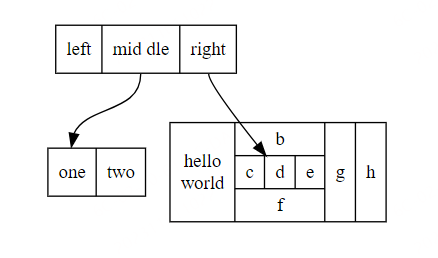
使用GraphVia画结构体
使用DEMO
1
2
3
4
5
6
7
8
| digraph structs {
node [shape=record];
struct1 [label="<f0> left|<f1> mid\ dle|<f2> right"];
struct2 [label="<f0> one|<f1> two"];
struct3 [label="hello\nworld |{ b |{c|<here> d|e}| f}| g | h"];
struct1:f1 -> struct2:f0;
struct1:f2 -> struct3:here;
}
|