Qt 自定义气泡
[toc]
1. 效果
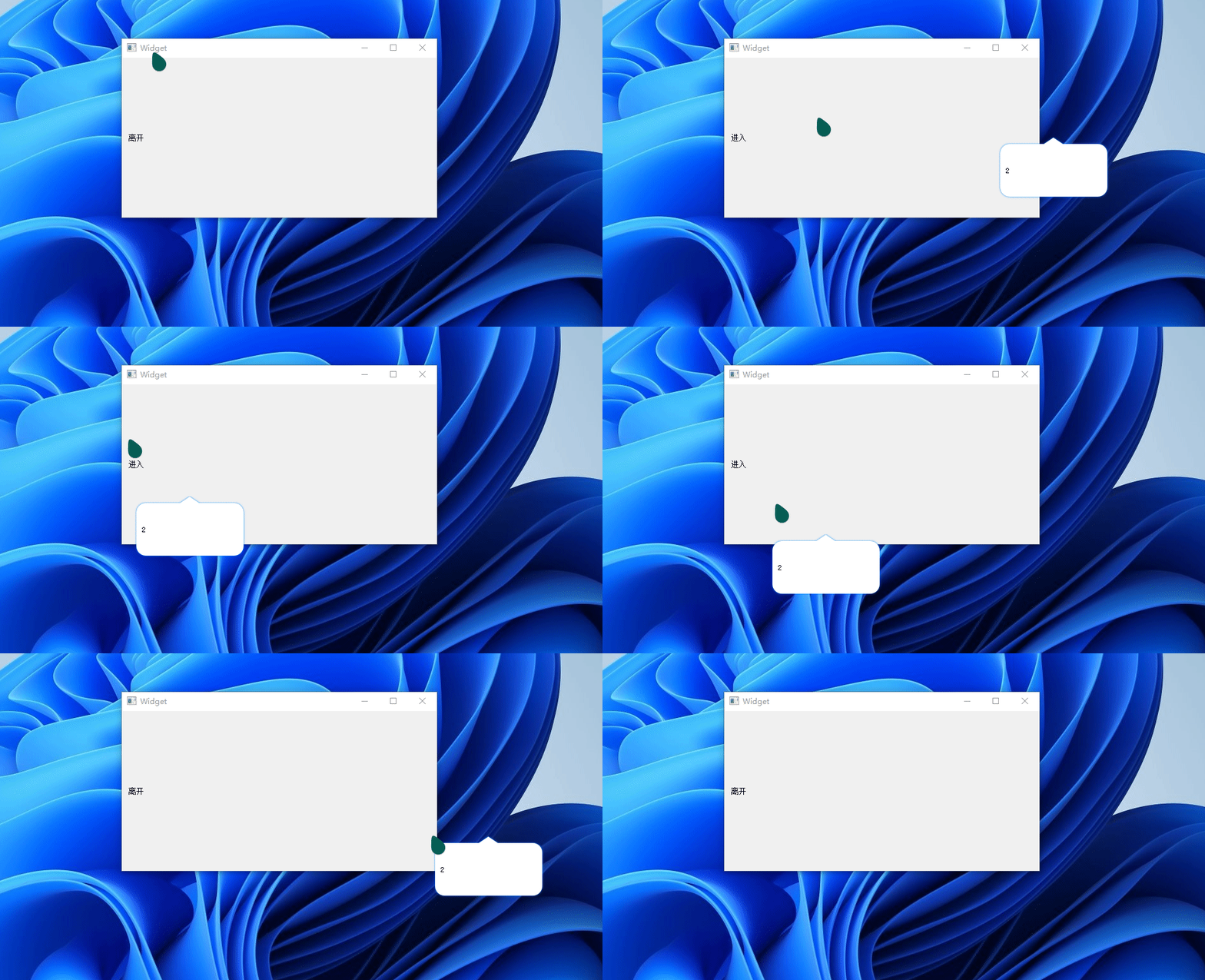
2. 实现逻辑
2.1. 绘制弹出的气泡
弹出气泡的主要部分已经用ui文件生成了,剩下的就是气泡的三角区域,也是比较难的一个部分
2.1.1. ui文件代码:
<?xml version="1.0" encoding="UTF-8"?>
<ui version="4.0">
 <class>qFloatWidget</class>
 <widget class="QWidget" name="qFloatWidget">
  <property name="geometry">
   <rect>
    <x>0</x>
    <y>0</y>
    <width>191</width>
    <height>105</height>
   </rect>
  </property>
  <property name="windowTitle">
   <string>Form</string>
  </property>
  <layout class="QGridLayout" name="gridLayout_2">
   <item row="0" column="0">
    <layout class="QGridLayout" name="gridLayout">
     <item row="0" column="0">
      <widget class="QStackedWidget" name="stackedWidget">
       <property name="currentIndex">
        <number>0</number>
       </property>
       <widget class="QWidget" name="page">
        <layout class="QGridLayout" name="gridLayout_4">
         <item row="0" column="0">
          <widget class="QLabel" name="label_2">
           <property name="text">
            <string>2</string>
           </property>
          </widget>
         </item>
        </layout>
       </widget>
       <widget class="QWidget" name="page_2">
        <layout class="QGridLayout" name="gridLayout_3">
         <item row="0" column="0">
          <widget class="QLabel" name="label">
           <property name="text">
            <string>1</string>
           </property>
          </widget>
         </item>
        </layout>
       </widget>
      </widget>
     </item>
    </layout>
   </item>
  </layout>
 </widget>
 <resources/>
 <connections/>
</ui>
2.1.2. 绘制三角区域代码
三角区域的位置可以根据自己的需求修改。
QPainter painter(this);
    QPainterPath drawPath;

    painter.setRenderHint(QPainter::Antialiasing, true);
    // painter.setPen(QPen(Qt::blue, 1));
    painter.setPen(Qt::NoPen);
    painter.setBrush(Qt::white);

    // 小三角区域;
    QPolygon trianglePolygon;

    QRect myRect(ui->stackedWidget->x(), ui->stackedWidget->y(), ui->stackedWidget->width(), ui->stackedWidget->height());

    // 设置小三的具体位置
    int tri_pos_x, tri_pos_y;

    m_offset = ui->stackedWidget->width() / 2  - m_triangleWidth / 2;
    switch (derect)
    {
    case up:{
        // 小三角左边的点的位置
        tri_pos_x = myRect.x() + m_offset;
        tri_pos_y = myRect.y();
        trianglePolygon << QPoint(tri_pos_x, tri_pos_y); // 小三角起点
        trianglePolygon << QPoint(tri_pos_x + m_triangleWidth, tri_pos_y);
        trianglePolygon << QPoint(tri_pos_x + m_triangleWidth / 2, tri_pos_y - m_triangleHeight);
    }
        break;
    case left:{
        // 小三上边点的位置
        tri_pos_x = myRect.x();
        tri_pos_y = myRect.y() + m_offset;
        trianglePolygon << QPoint(tri_pos_x, tri_pos_y);
        trianglePolygon << QPoint(tri_pos_x - m_triangleHeight, tri_pos_y + m_triangleWidth / 2);
        trianglePolygon << QPoint(tri_pos_x, tri_pos_y + m_triangleWidth);
    }
        break;
    case right:{
        // 小三上边点的位置
        tri_pos_x = myRect.x() + myRect.width();
        tri_pos_y = myRect.y() + m_offset;
        trianglePolygon << QPoint(tri_pos_x, tri_pos_y);
        trianglePolygon << QPoint(tri_pos_x + m_triangleHeight, tri_pos_y + m_triangleWidth / 2);
        trianglePolygon << QPoint(tri_pos_x, tri_pos_y + m_triangleWidth);
    }

        break;
    case down:{
        // 小三左边点的位置
        tri_pos_x = myRect.x() + m_offset;
        tri_pos_y = myRect.y() + myRect.height();
        trianglePolygon << QPoint(tri_pos_x, tri_pos_y);
        trianglePolygon << QPoint(tri_pos_x + m_triangleWidth / 2, tri_pos_y + m_triangleHeight);
        trianglePolygon << QPoint(tri_pos_x + m_triangleWidth, tri_pos_y);
    }
        break;
    default:
        break;
    }
    drawPath.addRoundedRect(myRect, BORDER_RADIUS, BORDER_RADIUS);
    drawPath.addPolygon(trianglePolygon);
    painter.drawPath(drawPath);
以上就是主要的绘图事件,创建了一个带三角的气泡界面。接下来就是在主界面去响应了。
2.2. 鼠标事件
鼠标时间还是用到了QLabel的过滤器,监听 QEvent::Enter 和 QEvent::Leave 两个事件。具体代码如下所示:
bool Widget::eventFilter(QObject *obj, QEvent *event)
{
    QString str = QString("<style> span {text-decoration: none; color: #006FFF;font-family: Microsoft YaHei;}</style>  <span>连接%1</span> <br> 虚拟地址:%2<br>登录地址:%3").arg("已成功").arg("192.168.0.0").arg("192.168.0.1");

    static int x = 0;
    static int y = 0;
    static uint8_t flag=0;
    if(obj == ui->label)
    {
        if(event->type() == QEvent::Enter)
        {
            ui->label->setText("进入");
            QPoint GlobalPoint(ui->label->mapToGlobal(QPoint(0, 0)));//获取控件在窗体中的坐标
            x = GlobalPoint.x();
            y = GlobalPoint.y() + ui->label->height();

            qDebug() << x << ":" << y ;
            m_widget->myMove(x, y);
            m_widget->setDerection(qFloatWidget::up);
            m_widget->show();
        }
        else if(event->type() == QEvent::Leave)
        {
            ui->label->setText(("离开"));
            m_widget->hide();
        }
    }

    return QWidget::eventFilter(obj,event);
}
2.3. 动画
动画内容比较简单,只需要创建一个简单的位移动画就可以了,当然也可以去掉动画,直接让气泡弹出。
    // 添加动画
    // 位移
    QPropertyAnimation *pPosAnimation1 = new QPropertyAnimation(m_widget, "pos");
    pPosAnimation1->setDuration(1000);
    pPosAnimation1->setStartValue(QCursor::pos());
    pPosAnimation1->setEndValue(QPoint(x,y));
    pPosAnimation1->setEasingCurve(QEasingCurve::InOutQuad);
    pPosAnimation1->start();
3. 完整代码
3.1. QFloatWidget.h
#ifndef QFLOATWIDGET_H
#define QFLOATWIDGET_H

#include <QWidget>

#if defined(_MSC_VER) && (_MSC_VER >= 1600)
    #pragma execution_character_set("utf-8")
#endif

const int SHADOW_WIDTH = 30;                 // 窗口阴影宽度;
const int TRIANGLE_WIDTH = 30;               // 小三角的宽度;
const int TRIANGLE_HEIGHT = 10;              // 小三角的高度;
const int BORDER_RADIUS = 15;                 // 窗口边角的弧度;


namespace Ui {
class qFloatWidget;
}

class qFloatWidget : public QWidget
{
    Q_OBJECT

public:
    qFloatWidget(QWidget *parent = nullptr);
    ~qFloatWidget();

    enum Derection{
        left,
        right,
        up,
        down
    };

    // 设置小三角起始位置;
    void setStartPos(int startX);
    // 设置小三角宽和高;
    void setTriangleInfo(int width, int height);
    // 设置小三角的位置
    void setDerection(Derection d);
    // 比起左上角的位置  用户更关心小三角的尖尖的位置 重载move以便用户更容易定位气泡框的位置
    // x,y 是气泡窗口小贱贱的坐标
    void myMove(int x, int y);

    void setWidgetIndex(int i);

protected:
    void paintEvent(QPaintEvent *);

private:
    // 小三角的偏移量;
    int m_offset;
    // 小三角的宽度;
    int m_triangleWidth;
    // 小三角高度;
    int m_triangleHeight;
    Derection derect;

    Ui::qFloatWidget *ui;
};

#endif // QFLOATWIDGET_H
3.2. QFloatWidget.cpp
#include "qfloatwidget.h"
#include "ui_qfloatwidget.h"

#include <QGraphicsDropShadowEffect>
#include <QHBoxLayout>
#include <QPoint>
#include <QPainter>
#include <QImage>
#include <QVariant>
#include <QPropertyAnimation>

qFloatWidget::qFloatWidget(QWidget *parent) :
    QWidget(parent),
    m_offset(50),
    m_triangleWidth(TRIANGLE_WIDTH),
    m_triangleHeight(TRIANGLE_HEIGHT),
    ui(new Ui::qFloatWidget)
{
    ui->setupUi(this);
    setWindowFlags(Qt::FramelessWindowHint);
    setAttribute(Qt::WA_TranslucentBackground);
    setAttribute(Qt::WA_NoSystemBackground);

    //设置具体阴影
    QGraphicsDropShadowEffect *shadow_effect = new QGraphicsDropShadowEffect(this);
    shadow_effect->setOffset(0, 0);
    shadow_effect->setColor(QColor(0, 133, 255));
    shadow_effect->setBlurRadius(5);
    this->setGraphicsEffect(shadow_effect);


}

qFloatWidget::~qFloatWidget()
{
    delete ui;
}

void qFloatWidget::setStartPos(int startX)
{
    m_offset = startX;
    repaint();
}

void qFloatWidget::setTriangleInfo(int width, int height)
{
    m_triangleWidth = width;
    m_triangleHeight = height;
}

void qFloatWidget::setDerection(Derection d)
{
    derect = d;
}

void qFloatWidget::myMove(int x, int y)
{
    int top_left_x, top_left_y;
    switch (derect) {
    case down:
        top_left_x = x - m_offset - m_triangleWidth / 2 - ui->stackedWidget->x();
        top_left_y = y - m_triangleHeight - ui->stackedWidget->height() - ui->stackedWidget->y();
        move(QPoint(top_left_x, top_left_y));
        break;
    case up:
        top_left_x = x - m_offset - m_triangleWidth / 2 - ui->stackedWidget->x();
        top_left_y = y + m_triangleHeight - ui->stackedWidget->y();
        move(QPoint(top_left_x, top_left_y));
        break;
    case left:
        top_left_x = x + m_triangleHeight - ui->stackedWidget->x();
        top_left_y = y - m_offset - m_triangleWidth / 2 - ui->stackedWidget->y();
        move(QPoint(top_left_x, top_left_y));
        break;
    case right:
        top_left_x = x - m_triangleHeight - ui->stackedWidget->width() - ui->stackedWidget->x();
        top_left_y = y - m_triangleWidth / 2 - m_offset - ui->stackedWidget->y();
        move(QPoint(top_left_x, top_left_y));
        break;
    default:
        break;
    }
}

void qFloatWidget::setWidgetIndex(int i)
{
    ui->stackedWidget->setCurrentIndex(i);
}

void qFloatWidget::paintEvent(QPaintEvent *)
{
    QPainter painter(this);
    QPainterPath drawPath;

    painter.setRenderHint(QPainter::Antialiasing, true);
    // painter.setPen(QPen(Qt::blue, 1));
    painter.setPen(Qt::NoPen);
    painter.setBrush(Qt::white);

    // 小三角区域;
    QPolygon trianglePolygon;

    QRect myRect(ui->stackedWidget->x(), ui->stackedWidget->y(), ui->stackedWidget->width(), ui->stackedWidget->height());

    // 设置小三的具体位置
    int tri_pos_x, tri_pos_y;

    m_offset = ui->stackedWidget->width() / 2  - m_triangleWidth / 2;
    switch (derect)
    {
    case up:{
        // 小三角左边的点的位置
        tri_pos_x = myRect.x() + m_offset;
        tri_pos_y = myRect.y();
        trianglePolygon << QPoint(tri_pos_x, tri_pos_y); // 小三角起点
        trianglePolygon << QPoint(tri_pos_x + m_triangleWidth, tri_pos_y);
        trianglePolygon << QPoint(tri_pos_x + m_triangleWidth / 2, tri_pos_y - m_triangleHeight);
    }
        break;
    case left:{
        // 小三上边点的位置
        tri_pos_x = myRect.x();
        tri_pos_y = myRect.y() + m_offset;
        trianglePolygon << QPoint(tri_pos_x, tri_pos_y);
        trianglePolygon << QPoint(tri_pos_x - m_triangleHeight, tri_pos_y + m_triangleWidth / 2);
        trianglePolygon << QPoint(tri_pos_x, tri_pos_y + m_triangleWidth);
    }
        break;
    case right:{
        // 小三上边点的位置
        tri_pos_x = myRect.x() + myRect.width();
        tri_pos_y = myRect.y() + m_offset;
        trianglePolygon << QPoint(tri_pos_x, tri_pos_y);
        trianglePolygon << QPoint(tri_pos_x + m_triangleHeight, tri_pos_y + m_triangleWidth / 2);
        trianglePolygon << QPoint(tri_pos_x, tri_pos_y + m_triangleWidth);
    }

        break;
    case down:{
        // 小三左边点的位置
        tri_pos_x = myRect.x() + m_offset;
        tri_pos_y = myRect.y() + myRect.height();
        trianglePolygon << QPoint(tri_pos_x, tri_pos_y);
        trianglePolygon << QPoint(tri_pos_x + m_triangleWidth / 2, tri_pos_y + m_triangleHeight);
        trianglePolygon << QPoint(tri_pos_x + m_triangleWidth, tri_pos_y);
    }
        break;
    default:
        break;
    }
    drawPath.addRoundedRect(myRect, BORDER_RADIUS, BORDER_RADIUS);
    drawPath.addPolygon(trianglePolygon);
    painter.drawPath(drawPath);
}
3.3. QFloatWidget.ui
<?xml version="1.0" encoding="UTF-8"?>
<ui version="4.0">
 <class>qFloatWidget</class>
 <widget class="QWidget" name="qFloatWidget">
  <property name="geometry">
   <rect>
    <x>0</x>
    <y>0</y>
    <width>191</width>
    <height>105</height>
   </rect>
  </property>
  <property name="windowTitle">
   <string>Form</string>
  </property>
  <layout class="QGridLayout" name="gridLayout_2">
   <item row="0" column="0">
    <layout class="QGridLayout" name="gridLayout">
     <item row="0" column="0">
      <widget class="QStackedWidget" name="stackedWidget">
       <property name="currentIndex">
        <number>0</number>
       </property>
       <widget class="QWidget" name="page">
        <layout class="QGridLayout" name="gridLayout_4">
         <item row="0" column="0">
          <widget class="QLabel" name="label_2">
           <property name="text">
            <string>2</string>
           </property>
          </widget>
         </item>
        </layout>
       </widget>
       <widget class="QWidget" name="page_2">
        <layout class="QGridLayout" name="gridLayout_3">
         <item row="0" column="0">
          <widget class="QLabel" name="label">
           <property name="text">
            <string>1</string>
           </property>
          </widget>
         </item>
        </layout>
       </widget>
      </widget>
     </item>
    </layout>
   </item>
  </layout>
 </widget>
 <resources/>
 <connections/>
</ui>
3.4. widget.h
#ifndef WIDGET_H
#define WIDGET_H

#include <QWidget>
#include <QMouseEvent>

#include "qmylabel.h"
#include "qfloatwidget.h"

#if defined(_MSC_VER) && (_MSC_VER >= 1600)
    #pragma execution_character_set("utf-8")
#endif

QT_BEGIN_NAMESPACE
namespace Ui { class Widget; }
QT_END_NAMESPACE

class Widget : public QWidget
{
    Q_OBJECT

public:
    Widget(QWidget *parent = nullptr);
    ~Widget();

protected:
    bool eventFilter(QObject *obj, QEvent *event);

private:
    Ui::Widget *ui;
    qFloatWidget *m_widget;
};
#endif // WIDGET_H
3.5. widget.cpp
#include "widget.h"
#include "ui_widget.h"
#include <QDebug>
#include<QPropertyAnimation>

#include <QGraphicsEffect>

Widget::Widget(QWidget *parent)
    : QWidget(parent)
    , ui(new Ui::Widget)
{
    ui->setupUi(this);
    m_widget = new qFloatWidget();
    ui->label->installEventFilter(this);
}

Widget::~Widget()
{
    delete ui;
}


bool Widget::eventFilter(QObject *obj, QEvent *event)
{
    QString str = QString("<style> span {text-decoration: none; color: #006FFF;font-family: Microsoft YaHei;}</style>  <span>连接%1</span> <br> 虚拟地址:%2<br>登录地址:%3").arg("已成功").arg("192.168.0.0").arg("192.168.0.1");

    static int x = 0;
    static int y = 0;
    static uint8_t flag=0;
    if(obj == ui->label)
    {
        if(event->type() == QEvent::Enter)
        {
            ui->label->setText("进入");
            QPoint GlobalPoint(ui->label->mapToGlobal(QPoint(0, 0)));//获取控件在窗体中的坐标
            x = GlobalPoint.x();
            y = GlobalPoint.y() + ui->label->height();

            qDebug() << x << ":" << y ;
            m_widget->myMove(x, y);
            m_widget->setDerection(qFloatWidget::up);
            m_widget->show();
        }
        else if(event->type() == QEvent::Leave)
        {
            ui->label->setText(("离开"));
            m_widget->hide();
        }
    }

    // 添加动画
    // 位移
    QPropertyAnimation *pPosAnimation1 = new QPropertyAnimation(m_widget, "pos");
    pPosAnimation1->setDuration(1000);
    pPosAnimation1->setStartValue(QCursor::pos());
    pPosAnimation1->setEndValue(QPoint(x,y));
    pPosAnimation1->setEasingCurve(QEasingCurve::InOutQuad);
    pPosAnimation1->start();
    return QWidget::eventFilter(obj,event);
}
3.6. widget.ui
<?xml version="1.0" encoding="UTF-8"?>
<ui version="4.0">
 <class>Widget</class>
 <widget class="QWidget" name="Widget">
  <property name="geometry">
   <rect>
    <x>0</x>
    <y>0</y>
    <width>497</width>
    <height>252</height>
   </rect>
  </property>
  <property name="windowTitle">
   <string>Widget</string>
  </property>
  <layout class="QGridLayout" name="gridLayout">
   <item row="0" column="0">
    <widget class="QLabel" name="label">
     <property name="text">
      <string>123123123123</string>
     </property>
     <property name="textFormat">
      <enum>Qt::PlainText</enum>
     </property>
     <property name="wordWrap">
      <bool>false</bool>
     </property>
    </widget>
   </item>
  </layout>
 </widget>
 <resources/>
 <connections/>
</ui>