[toc]
一、获取窗口大小尺寸信息
Qt 窗口尺寸,窗口大小和大小改变引起的事件 QResizeEvent。
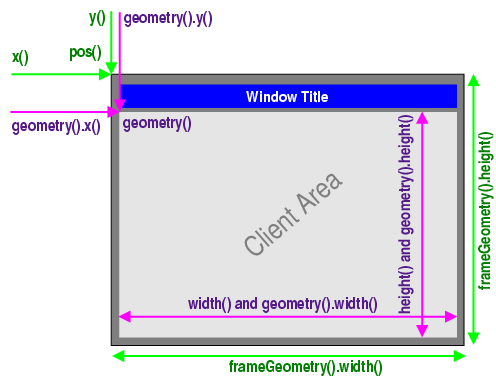
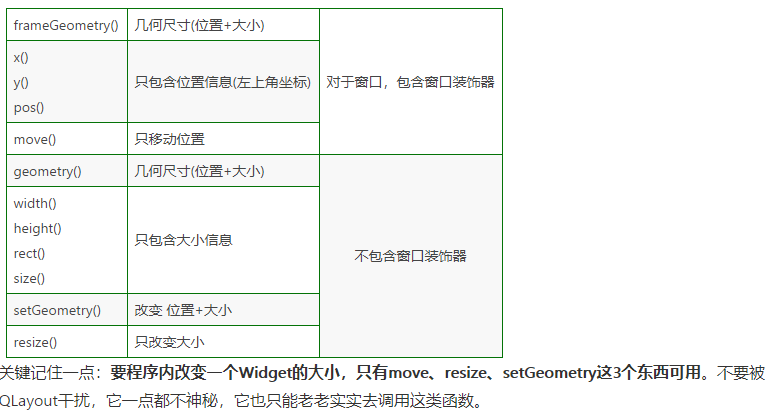
涉及坐标、长宽的接口
    //窗口左上角的位置(含边框)
    qDebug() << this->frameGeometry().x() << this->frameGeometry().y() << ;//1
    qDebug() << this->x()  << this->y();//2
    qDebug() << this->pos().x() << this->pos().y();//3
    //窗口的宽度和高度(含边框)
    qDebug() << this->frameGeometry().width() << this->frameGeometry().height();
    //窗口左上角的位置(不含边框)
    qDebug() << this->geometry().x() << this->geometry().y();
    //窗口的宽度和高度(不含边框)
    qDebug() << this->geometry().width() << this->geometry().height();//1
    qDebug() << this->width() << this->height();//2
    qDebug() << this->rect().width() << this->rect().height();//3
    qDebug() << this->size().width() << this->size().height();//4
Qt获取系统屏幕大小
QDesktopWidget 提供了详细的位置信息,其能够自动返回窗口在用户窗口的位置和应用程序窗口的位置。
    QDesktopWidget* pDesktopWidget = QAPPLication::desktop();
    //获取可用桌面大小
    QRect deskRect = QApplication::desktop()->availableGeometry();
    //获取主屏幕分辨率
    QRect screenRect = QApplication::desktop()->screenGeometry();
    //获取屏幕数量
    int nScreenCount = QApplication::desktop()->screenCount();
Qt5开始, QDesktopWidget官方不建议使用,改为 QScreen
#include<QScreen>
#include<QRect>

QList<QScreen *> list_screen =  QGuiApplication::screens();  //多显示器
QRect rect = list_screen.at(0)->geometry();
desktop_width = rect.width();
desktop_height = rect.height();
qDebug() << desktop_width <<desktop_height;
三、设置窗体大小
void setGeometry(int x, int y, int w, int h)

void setGeometry(const QRect &)

void resize(int w, int h)

void resize(const QSize &)
四、Qt获取控件位置坐标、屏幕坐标、相对父窗体坐标
- 这个只是返回相对这个
widget(重载了QMouseEvent的widget)的位置。
QPoint QMouseEvent::pos()- 窗口坐标,这个是返回鼠标的全局坐标
QPoint QMouseEvent::globalPos()- 相对显示器的全局坐标
QPoint QCursor::pos() [static]- 将窗口坐标转换成显示器坐标
QPoint QWidget::mapToGlobal(const QPoint & pos) const- 将显示器坐标转换成窗口坐标
QPoint QWidget::mapFromGlobal(const QPoint & pos) const- 将窗口坐标获得的
pos转成父类widget的坐标
QPoint QWidget::mapFromParent(const QPoint & pos) const- 将当前窗口坐标转换成指定
parent坐标
QPoint QWidget::mapTo(const QWidget * parent, const QPoint &pos) const- 这个属性获得的是当前目前控件在父窗口中的位置
const QPointF &QMouseEvent::screenPos() const- Returns the pOSItion of the mouse cursor asa QPointF, relative to the screen that received the event.
和
QPoint QMouseEvent::globalPos()值相同,但是类型更高精度的QPointFThis function was introduced in Qt 5.0.
const QPointF &QMouseEvent::screenPos() const- 获取全局坐标
QCursor::pos() == QMouseEvent::globalPos() - 将鼠标的坐标转换成全局坐标
QMouseEvent::globalPos() == ui.posBtn->mapToGlobal(ui.posBtn->pos());- 将鼠标坐标(鼠标当前坐标,QCursor::pos())直接转换成当前窗口相对坐标
ui.posBtn->mapFromGlobal(QCursor::pos());