阅读这篇文章你会了解到:
- AppDomain 是什么
- SystemDomain、SharedDomain、DefaultDomain
- 如何创建 AppDomain
- 如何跨 AppDomain 加载程序集并调用指定接口
相关文章:
The Truth About .NET Objects And Sharing Them Between AppDomains - Geeks with Blogs
AppDomain & Assembly
应用程序域是 .NET 中用于提供隔离的执行环境的一个概念,它允许在同一个进程中运行多个应用程序域,每个应用程序域都有自己独立的代码、数据和配置。应用程序域之间是相互隔离的,这种隔离提供了更高的安全性和稳定性,并允许动态加载和卸载程序集。
关于 AppDomain 我的理解是,可以参考系统和进程。一个系统由多个进程,一个进程可以有多个AppDomain。AppDomain 之间也和进程一样是隔离的。但不同的是,AppDomain 又大致分为三类,SystemDomain、ShreadDomain、DefaultDomain 官方并没有对这三个 AppDomain 进行说明。这里我就个人理解说明一下:
用 Windbg 调试可以使用 !DumpDomain 查看域信息,可以转储一个 w3wp 的 dump 调试一下看看。这里以 w3wp 为例。
-
SystemDomain:
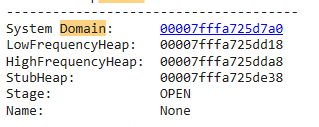
描述:
SystemDomain是 .NET 运行时启动时创建的第一个应用程序域。它主要用于加载和执行与 .NET 运行时自身相关的核心库和代码,如mscorlib.dll,该库包含了 .NET Framework 的基本类。功能:
- 管理 .NET 运行时的启动和初始化。
- 加载和执行 .NET 运行时的核心组件。
- 提供一个安全的隔离环境,以确保 .NET 运行时的稳定性。
-
SharedDomain:
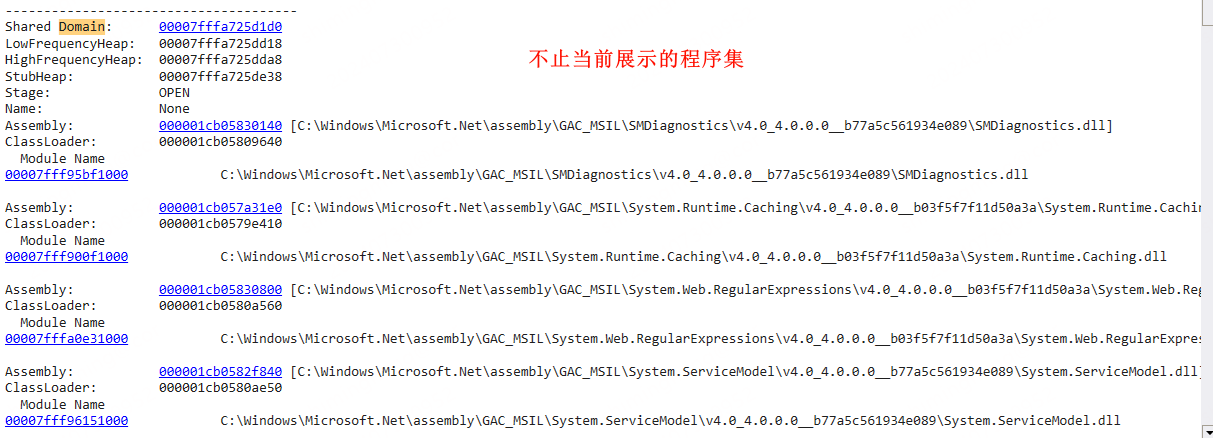
描述:
SharedDomain是一个特殊的应用程序域,用于共享 .NET 运行时中某些全局静态数据。这个域通常用于托管全局的和通用的类型,例如共享类型和静态字段,以减少内存使用和提高性能。功能:
- 提供一个全局共享的区域,用于存储共享的静态数据和类型。
- 优化内存使用和性能,通过减少冗余的静态数据。
-
DefaultDomain:
》DefaultDomain1: DefaultDomain
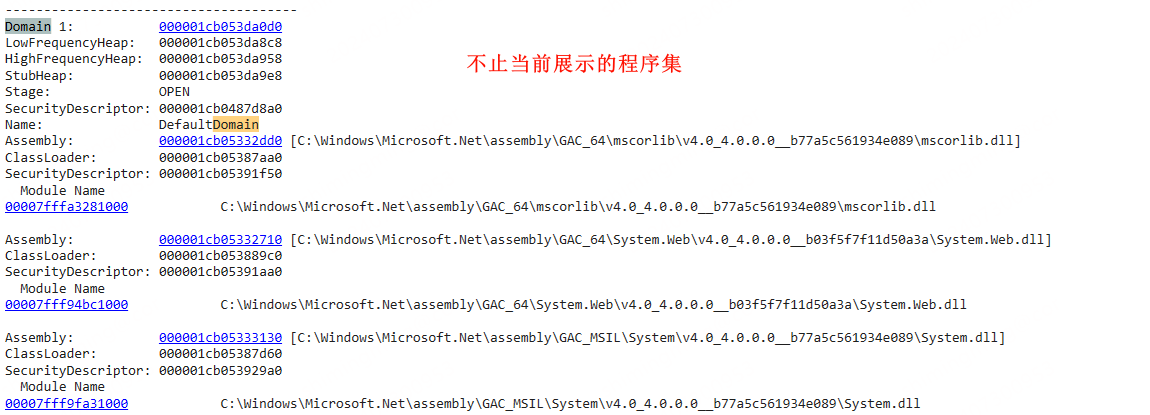 》 DefaultDomain2:
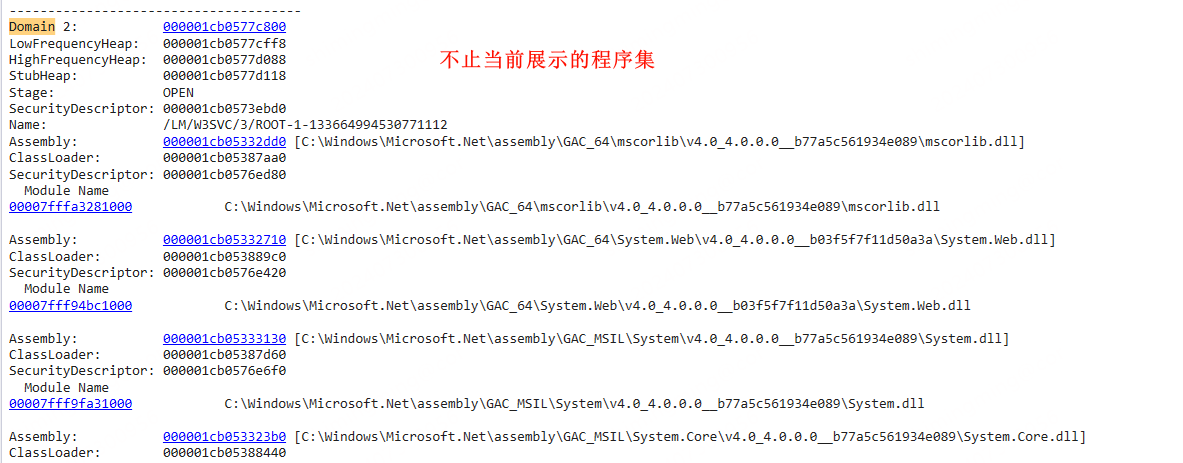
描述:
DefaultDomain是在 .NET 运行时启动之后创建的第一个应用程序域,用于加载并执行应用程序代码。每个 .NET 进程启动时,都会自动创建一个DefaultDomain。功能:
- 加载并执行应用程序代码。
- 提供一个隔离的执行环境,用于托管应用程序的代码和资源。
- 支持跨应用程序域的代码和资源隔离,提高安全性和稳定性。
在AppDomain中调用
方法一:
public class SimpleAssemblyLoader : MarshalByRefObject
{
    public void Load(string path)
    {
        ValidatePath(path);

        Assembly.Load(path);
    }

    public void LoadFrom(string path)
    {
        ValidatePath(path);

        Assembly.LoadFrom(path);
    }

    private void ValidatePath(string path)
    {
        if (path == null) throw new ArgumentNullException("path");
        if (!System.IO.File.Exists(path))
            throw new ArgumentException(String.Format("path \"{0}\" does not exist", path));
    }
}
方法二:
public class SimpleAssemblyLoader : MarshalByRefObject
{
    public void Load(string path)
    {
        ValidatePath(path);

        Assembly.Load(path);
    }

    public void LoadFrom(string path)
    {
        ValidatePath(path);

        Assembly.LoadFrom(path);
    }

    private void ValidatePath(string path)
    {
        if (path == null) throw new ArgumentNullException("path");
        if (!System.IO.File.Exists(path))
            throw new ArgumentException(String.Format("path \"{0}\" does not exist", path));
    }
}
如何使用:
Type proxyType = typeof(Sandboxer);
MarshalByRefObject proxy =
    (MarshalByRefObject)domain.
    CreateInstanceFrom(
    proxyType.Assembly.Location,
    proxyType.FullName).Unwrap();
JIT On Another AppDomain
 ObjectHandle handle = Activator.CreateInstanceFrom(
     domain, typeof(Process).Assembly.ManifestModule.FullyQualifiedName,
     typeof(Process).FullName
 );

 //TODO 尝试 JIT
 ObjectHandle handle1 = domain.CreateInstanceFrom(
     typeof(Process).Assembly.ManifestModule.FullyQualifiedName,
     typeof(Process).FullName
 );
 Process DomainProcess = (Process)handle.Unwrap();
 var Methods = DomainProcess.GetType().GetRuntimeMethods().ToList();
 var StartWithCreateProcess = Methods.Where(_ => _.Name == "StartWithShellExecuteEx").FirstOrDefault();
 var StartWithShellExecuteEx = Methods.Where(_ => _.Name == "StartWithCreateProcess").FirstOrDefault();

 var methodhandle = StartWithCreateProcess.MethodHandle;
 var methodAttr = StartWithCreateProcess.Attributes;
 var methodType = methodhandle.GetType();
if(false)
 {
     try
     {
         StartWithCreateProcess.Invoke(null, null);
         StartWithShellExecuteEx.Invoke(null, null);

     }
     catch (Exception ex)
     {
         int error = Marshal.GetLastWin32Error();
         Natives.OutputDebug(ex.StackTrace + $"error:{error}, " + ex.Message);
     }
 }
 // RuntimeHelpers.PrepareMethod(StartWithShellExecuteEx);

 if (!((methodAttr & MethodAttributes.Abstract) == MethodAttributes.Abstract || methodType.ContainsGenericParameters))
 {
     RuntimeHelpers.PrepareMethod(methodhandle);
 }
 methodhandle = StartWithCreateProcess.MethodHandle;
创建 AppDomain 并传递数据
如下所示,循环创建 AppDomain 并传递数据到所创建的 AppDomain 中。
class Program {
  /// <summary>
  /// Show how to pass an object by reference directly into another appdomain
  /// without serializing it at all.
  /// </summary>
  /// <param name="args"></param>
  [LoaderOptimization(LoaderOptimization.MultiDomainHost)]
  static public void Main(string[] args) {
    for (int i = 0; i < 10000;
         i++)  // try it often to see how the AppDomains do behave
    {
      // To load our assembly appdomain neutral we need to use MultiDomainHost
      // on our hosting and child domain If not we would get different Method
      // tables for the same types which would result in InvalidCastExceptions
      // for the same type.
      // Prerequisite for MultiDomainHost is that the assembly we share the data
      // is a) Installed into the GAC (which requires as strong name as well) If
      // you would use MultiDomain then it would work but all AppDomain neutral
      // assemblies will never be unloaded.
      var other = AppDomain.CreateDomain(
          "Test" + i.ToString(), AppDomain.CurrentDomain.Evidence,
          new AppDomainSetup {
            LoaderOptimization = LoaderOptimization.MultiDomainHost,
          });

      // Create gate object in other appdomain
      DomainGate gate = (DomainGate)other.CreateInstanceAndUnwrap(
          Assembly.GetExecutingAssembly().FullName,
          typeof(DomainGate).FullName);

      // now lets create some data
      CrossDomainData data = new CrossDomainData();
      data.Input = Enumerable.Range(0, 10).ToList();

      // process it in other AppDomain
      DomainGate.Send(gate, data);

      // Display result calculated in other AppDomain
      Console.WriteLine("Calculation in other AppDomain got: {0}",
                        data.Aggregate);

      AppDomain.Unload(other);
      // check in debugger now if UnitTests.dll has been unloaded.
      Console.WriteLine("AppDomain unloaded");
    }
  }
使用 LoaderOptimzation.MultiDomainHost 卸载在另一个 AppDomain 没有 GC 的程序集。同时必须从 GAC 加载自定义的 CrossDomainData 的程序集。
/// <summary>
/// Enables sharing of data between appdomains as plain objects without any
/// marsalling overhead.
/// </summary>
class DomainGate : MarshalByRefObject {
  /// <summary>
  /// Operate on a plain object which is shared from another AppDomain.
  /// </summary>
  /// <param name="gcCount">Total number of GCs</param>
  /// <param name="objAddress">Address to managed object.</param>
  public void DoSomething(int gcCount, IntPtr objAddress) {
    if (gcCount != ObjectAddress.GCCount) {
      throw new NotSupportedException(
          "During the call a GC did happen. Please try again.");
    }

    // If you get an exception here disable under Projces/Debugging/Enable
    // Visual Studio Hosting Process The appdomain which is used there seems to
    // use LoaderOptimization.SingleDomain
    CrossDomainData data =
        (CrossDomainData)PtrConverter<Object>.Default.ConvertFromIntPtr(
            objAddress);
    ;

    // process input data from other domain
    foreach (var x in data.Input) {
      Console.WriteLine(x);
    }

    OtherAssembliesUsage user = new OtherAssembliesUsage();

    // generate output data
    data.Aggregate = data.Input.Aggregate((x, y) => x + y);
  }

  public static void Send(DomainGate gate, object o) {
    var old = GCSettings.LatencyMode;
    try {
      GCSettings.LatencyMode =
          GCLatencyMode.Batch;  // try to keep the GC out of our stuff
      var addandGCCount = ObjectAddress.GetAddress(o);
      gate.DoSomething(addandGCCount.Value, addandGCCount.Key);
    } finally {
      GCSettings.LatencyMode = old;
    }
  }
}
获取不同 AppDomain 下的程序集地址
参考文章
Jitex/src/Jitex/Utils/ModuleHelper.cs at 89e3faa23b1a38933c46915c6ad5b1c6964824dd · Hitmasu/Jitex
原理
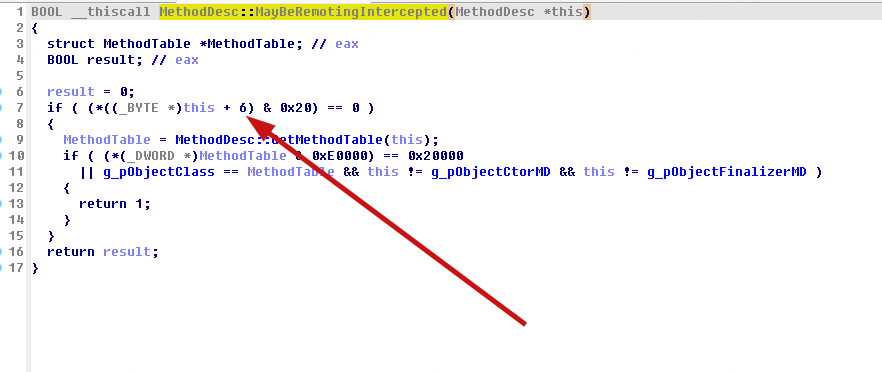
主要通过 Module. m_pData 获取程序加载地址。不同 AppDomain 下程序集的加载地址是不同的。
JIT 调用原理
private static int GetInvocationFlags(MethodInfo method)
{
    if (method == null) return 0;

    try
    {
        // 运行时实际类型(通常是内部的 RuntimeMethodInfo):
        Type runtimeType = method.GetType();
        // 尝试读取非公开字段 m_invocationFlags(在当前 CLR 实现中存在)
        var f = runtimeType.GetField("m_invocationFlags", BindingFlags.NonPublic | BindingFlags.Instance);
        if (f != null)
        {
            object val = f.GetValue(method);
            if (val != null)
            {
                // boxed enum -> 转为 int
                return Convert.ToInt32(val);
            }
        }
    }
    catch
    {
        // 忽略反射失败,走下一步回退方案
    }

    try
    {
        // 回退:读取 MethodDesc 的 m_dwFlags(第 6 字节),已有代码中也使用类似方式
        IntPtr handle = method.MethodHandle.Value;
        byte b = Marshal.ReadByte(IntPtr.Add(handle, 6));
        return (int)b;
    }
    catch
    {
        return 0;
    }
}

// 如下所示为修改标志位并执行 PrePareMethod 的逻辑
// OldMethod 获取逻辑如下所示
// this.OldMethod = Clazz.GetMethod(TargetMethodName, this.oldbindingfalgs);

// InvocationFlags
uint INVOCATION_FLAGS_INITIALIZED = 0x00000001;

// MethodDescClassification
byte mdcRequiresInheritanceCheck = 0x80;
byte mdcStatic = 0x20;

byte bTargetMDC = 0;
// 读取  m_dwFlags 字段,判断方法是否已经被初始化
byte bOriginMDC = 0;

bool bChangeMDC = false;
if (this.OldMethod != null)
{
    uint flags = (uint)GetInvocationFlags(this.OldMethod);
    Natives.OutputInfo("OldMethod InvocationFlags: " + flags);

    if((INVOCATION_FLAGS_INITIALIZED & flags) == INVOCATION_FLAGS_INITIALIZED)
    {
        bOriginMDC = Marshal.ReadByte(this.OldMethod.MethodHandle.Value + 6);
        int iNextFlag = Marshal.ReadInt32(this.OldMethod.MethodHandle.Value + 8);
        if (iNextFlag < 0xFF &&
            (bOriginMDC & mdcRequiresInheritanceCheck) == mdcRequiresInheritanceCheck)
        {
            bChangeMDC = true;
            Reporter.OutputInfo("The OldMethod has been initialized before hook, Method:" + this.HookMethodName);
            bTargetMDC = bOriginMDC;
            bTargetMDC &= 0x0F; // 保留其他标志位不变
            bTargetMDC |= mdcStatic;
            Marshal.WriteByte(this.OldMethod.MethodHandle.Value + 6, (byte)bTargetMDC);
        }
    }
}

RuntimeHelpers.PrepareMethod(OldMethod.MethodHandle);
if(bChangeMDC)
{
    Marshal.WriteByte(this.OldMethod.MethodHandle.Value + 6, bOriginMDC);
}