概述:PostgreSQL 弱密码研究
版本:postgres (PostgreSQL) 10.11 (目前只有版本 10 提供32位,从11开始只有64位,最新版16.1)
源码阅读推荐文章:
免责声明:本文所涉及的信息安全技术知识仅供参考和学习之用,并不构成任何明示或暗示的保证。读者在使用本文提供的信息时,应自行判断其适用性,并承担由此产生的一切风险和责任。本文作者对于读者基于本文内容所做出的任何行为或决定不承担任何责任。在任何情况下,本文作者不对因使用本文内容而导致的任何直接、间接、特殊或后果性损失承担责任。读者在使用本文内容时应当遵守当地法律法规,并保证不违反任何相关法律法规。
PostgreSQL 下载地址:EDB: Open-Source, Enterprise Postgres Database Management
0x01 源码编译
参考文章:windows下编译调试PostgreSQL_postgresql-16.0 window 编译-CSDN博客
前提
- 安装perl Strawberry Perl for Windows
- 安装mingw(直接下载编译好的文件,添加环境变量)
- 下载链接:MinGW-w64 - for 32 and 64 bit Windows - Browse /mingw-w64/mingw-w64-release at SourceForge.net 找到 ==[x86_64-win32-seh](https://sourceforge.net/projects/mingw-w64/files/Toolchains targetting Win64/Personal Builds/mingw-builds/8.1.0/threads-win32/seh/x86_64-8.1.0-release-win32-seh-rt_v6-rev0.7z)== 下载
- 配置环境变量,将下载解压后的
bin目录配置到环境变量path中
- 2017 developer command 切换到源码目录
*\postgresql-16.1\src\[[【RPC】Tools|Tools]]\msvc build.bat等待编译完成,之后就可以下一步进行安装了install 安装目录
0x02 安装使用
官方下载:PostgreSQL: Windows installers
- installer下载: Community DL Page
参考文章: PostgreSQL下载与安装(Windows版)_postgresql 安装-CSDN博客
命令行安装
初始化数据库
initdb -D 数据库目录
# 示例
initdb -D C:\PostgreSQL\postgresql-16.1-1-windows-x64-binaries\pgsql\data
启动服务
pg_ctl -D C:\PostgreSQL\postgresql-16.1-1-windows-x64-binaries\pgsql\data start创建用户
createuser -s -r postgres
# -s 表示创建超级用户
# -r 表示这个角色可以创建新的角色
# -e 显示发送到服务端的命令
# -P 给角色指定口令
# 帮助命令
createuser --help

createuser -s -r -P 用户名
运行shell环境
# -U 指定数据库
# -h 服务器地址
# -p 连接端口
# -U 指定用户,如果不是 postgres,则需要指定数据库,使用 -d
# -d 指定数据库
psql -h localhost -p 5432 -U postgres

psql -h 192.168.6.12 -U test -d postgres -p 5432
修改登录密码相关
默认安装启动后。使用 psql 连接数据库是不需要密码的。
# 默认数据库用户
postgres=# select oid,rolname,rolpassword from pg_authid;
  oid  |           rolname           | rolpassword
-------+-----------------------------+-------------
    10 | holdy                       |
  6171 | pg_database_owner           |
  6181 | pg_read_all_data            |
  6182 | pg_write_all_data           |
  3373 | pg_monitor                  |
  3374 | pg_read_all_settings        |
  3375 | pg_read_all_stats           |
  3377 | pg_stat_scan_tables         |
  4569 | pg_read_server_files        |
  4570 | pg_write_server_files       |
  4571 | pg_execute_server_program   |
  4200 | pg_signal_backend           |
  4544 | pg_checkpoint               |
  4550 | pg_use_reserved_connections |
  6304 | pg_create_subscription      |
 16387 | postgres                    |
(16 rows)
如果需要配置,则需要修改 **\pgsql\data\pg_hba.conf 文件, 它用于配置用户登录的相关策略,如密码,连接方式等,如下所示为 数据库对应的连接方式及密码发送方式。
第9行修改了所有用户使用IPv6登录时需要发送明文密码。
# TYPE  DATABASE        USER            ADDRESS                 METHOD

# "local" is for Unix domain socket connections only
# local   all             all                                     trust
local   all     		postgres					scram-sha-256
# IPv4 local connections:
host    all             all             127.0.0.1/32            trust
# IPv6 local connections:
host    all             all             ::1/128                 password
# Allow replication connections from localhost, by a user with the
# replication privilege.
local   replication     all                                     trust
host    replication     all             127.0.0.1/32            trust
host    replication     all             ::1/128                 trust
0x03 进程相关
进入 psql 环境后使用 SELECT pg_backend_pid(); 查找后台进程 pid。每个psql 实例都会创建一个进程
环境变量
-
服务进程 pg_ctl.exe
-
PGDATA C:/Program Files (x86)/PostgreSQL/10/data
-
PGLOCALEDIR C:/Program Files (x86)/PostgreSQL/10/share/locale
-
PGSYSCONFDIR C:/Program Files (x86)/PostgreSQL/10/etc
-
-
普通用户进程 pgAdmin4.exe
- APPDATA C:\Users\testm\AppData\Roaming
0x04 用户及数据库
用户
默认用户为 postgres,密码为安装时输入的密码
创建用户及授权
# 创建用户
create user weak1 with password '123321';

# 修改密码
ALTER USER postgres WITH PASSWORD 'Admin@123';

# 授权
GRANT ALL PRIVILEGES ON DATABASE postgres TO weak1;

# 查看用户
select * from pg_shadow;
select * from pg_authid;
select * from pg_roles;

# 查看密码相关
select oid,rolname,rolpassword from pg_authid;
为用户授权
-- 切换到doki_database下
\c doki_database
-- 收回用户在public下所有表的所有权限
REVOKE ALL PRIVILEGES ON ALL TABLES IN SCHEMA public FROM doki
-- 为doki赋予doki_database下的所有权限
GRANT ALL PRIVILEGES ON ALL TABLES IN SCHEMA public TO doki;
GRANT ALL PRIVILEGES ON ALL SEQUENCES IN SCHEMA public TO doki;
数据库
查看数据库
# 查看数据库
\l

#使用数据库
\c 数据库名

#查看表
select * from pg_tables;
用户数据文件
当前版本下,用户信息存放于 C:\Program Files (x86)\PostgreSQL\10\data\global\1260 这个文件中。
补充一版获取用户信息的代码:
// ReadPostgreSQL.cpp : 此文件包含 "main" 函数。程序执行将在此处开始并结束。
//

#include <iostream>
#include <windows.h>
using namespace std;

#ifdef _DEBUG
	//
	// DEBUG
	//
#ifndef DBG_NEW
#define DBG_NEW new ( _NORMAL_BLOCK , __FILE__ , __LINE__ )
#define new DBG_NEW
#endif

#define _CRTDBG_MAP_ALLOC
#include <stdlib.h>
#include <crtdbg.h>

#define OS_FREE(pMem)			free(pMem)
#define OS_ALLOC(Size)			calloc(Size,1);
#define OS_DEBUG(...)			_cprintf(__VA_ARGS__)
#define DEBUG_BREAK()			__debugbreak()
#else
	//
	// RELEASE
	//
#define OS_FREE(pMem)			HeapFree(GetProcessHeap(), 0, pMem)
#define OS_ALLOC(Size)			HeapAlloc(GetProcessHeap(), HEAP_ZERO_MEMORY, Size)
#define OS_DEBUG(...)			_cprintf(__VA_ARGS__)
#define DEBUG_BREAK()
#endif  // _DEBUG

#pragma pack(1)
typedef struct _PSTSQL_HEADER {
	WORD filler[7];
	WORD base;
} PSTSQLHEADER, * PPSTSQLHEADER;

typedef struct _PST_USER_PRIV {
	BYTE rolsuper;
	BYTE rolinherit;
	BYTE rolcreaterole;
	BYTE rolcreatedb;
	BYTE rolcanlogin;
	BYTE rolreplication;
	BYTE rolconnlimit;
	BYTE rolpassword;
}PSTUSERPRIV;

typedef struct _PSTSQL_USER {
	BYTE filler[28];
	UINT32 oid;
	BYTE name[64];
	PSTUSERPRIV priv;
	BYTE password_encryption[8];
	BYTE md5[32];
} PSTSQLUSER, * PPSTSQLUSER;

#pragma pack()

/**
 * @brief 解析 1260 文件内容
 * @detail
 *
 * @param mapAddress 1260 文件内容
 * @param StopSize 停止读取的位置
 * @return void
 */
void ListUsers(PVOID mapAddress, int StopSize)
{
	BYTE UserFlag[8] = { 0xFF,0xFF,0xFF,0xFF,0x49,0x6D,0x64,0x35 };
	PPSTSQLHEADER pstHeader = NULL;
	PPSTSQLUSER nextRecordPtr = NULL;
	PVOID buffer = NULL;
	size_t num_read = 0;
	int FlagSize = 0x14;
	PPSTSQLUSER pUser;

	pstHeader = (PPSTSQLHEADER)mapAddress;

	if (pstHeader->base == NULL) goto End;

	// 处理数据
	buffer = (PVOID)((PBYTE)mapAddress+(DWORD)pstHeader->base);
	FlagSize += (int)pstHeader->base;
	pUser = (PPSTSQLUSER)buffer;
	while (FlagSize < StopSize)
	{
		int size = sizeof(PSTSQLUSER);

		if (memcmp(pUser->password_encryption, UserFlag, 8))
		{
			printf("[!]Maybe it's not User");
			break;
		}

		num_read++;
		FlagSize += size;
		printf("%d %s %s\n", pUser->oid, (char*)pUser->name, (char*)pUser->md5);

		buffer = (PVOID)((PBYTE)mapAddress + ((DWORD)pstHeader->base + size * num_read));
		pUser = (PPSTSQLUSER)buffer;
		continue;
	}

End:
	return;
}

int main(int argc, const char* argv[])
{
	cout << sizeof(PSTSQLUSER) << endl;
	cout << sizeof(CHAR) << endl;

	if (argc != 2)
	{
		printf("\nLoad the PostgreSQL and print the data.\n");
		printf("Author:holdyounger\n");
		printf("Usage:\n");
		printf("     %s <file path of data file>\n", argv[0]);
		printf("eg:\n");
		printf("     %s C:\\Program Files (x86)\\PostgreSQL\\10\\data\\global\\1260\n\n", argv[0]);
		printf("[!]Wrong parameter\n");
		return 0;
	}

	FILE* fp;
	int err = fopen_s(&fp, argv[1], "a+");
	if (err != 0)
	{
		printf("openfile error!");
		return 0;
	}

	fseek(fp, 0, SEEK_END);
	int len = ftell(fp);
	unsigned char* buf = new unsigned char[len];
	fseek(fp, 0, SEEK_SET);
	fread(buf, len, 1, fp);
	ListUsers(buf, len);
	fclose(fp);

	delete buf;
	getchar();
	return 0;
}
补充一个删除用户后的标志位变动:
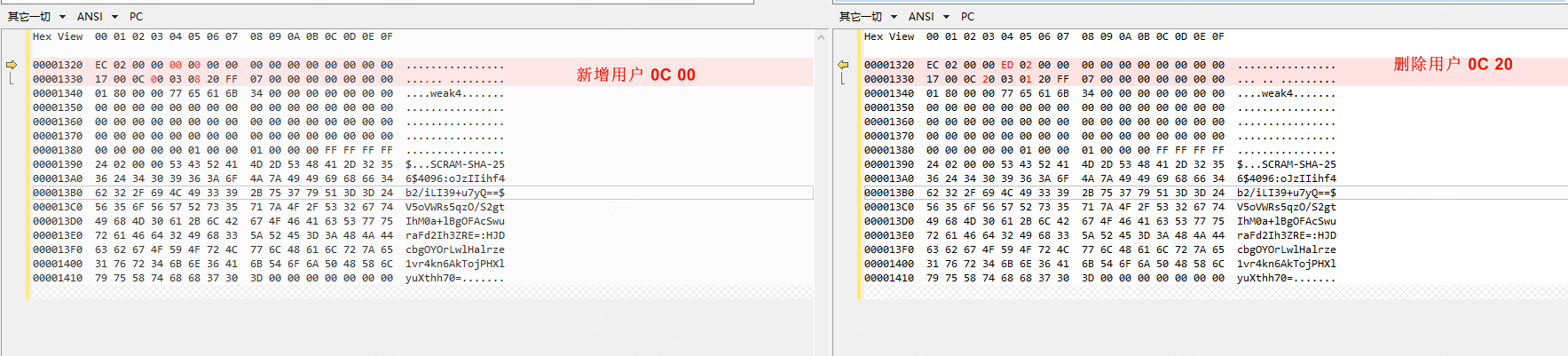
用户权限表
postgres=# select * from pg_roles;
密码策略
密码加密方式
EncryptPassword = hash(\input.$salt)$
postgres=# show password_encryption;
 password_encryption
---------------------
 md5
(1 行记录)
用户列表
postgres=# select * from pg_shadow;
 usename  | usesysid | usecreatedb | usesuper | userepl | usebypassrls |               passwd                | valuntil | useconfig
----------+----------+-------------+----------+---------+--------------+-------------------------------------+----------+-----------
 postgres |       10 | t           | t        | t       | t            | md50a1941672347c11b1c71aeb0bae8859f |          |
(1 行记录)
密码有效期
pg支持密码有效期配置,可以通过配置密码有效期,制定密码更换周期。
# 服务器端设置有效期
postgres=# alter role test valid until '2019-04-10 16:58:00';
ALTER ROLE
postgres=# select * from pg_user where usename='test';
usename | usesysid | usecreatedb | usesuper | userepl | usebypassrls | passwd | valuntil | useconfig
---------+----------+-------------+----------+---------+--------------+----------+------------------------+-----------
test | 49156 | f | f | f | f | ******** | 2019-04-10 16:58:00+08 |
(1 row)


# 客户端连接测试
[postgres@pg2 ~]$ date
Wed Apr 10 17:11:49 CST 2019
[postgres@pg2 ~]$ psql -h 192.168.6.12 -U test -d postgres -p 5432
Password for user test:
psql: FATAL: password authentication failed for user "test"
注意:
- pg密码有效期仅针对客户端有效,服务器端不受限制。
- 网络访问控制文件中不能配置为tRust认证方式
密码复杂度
passwordcheck 模块可以实现密码复杂度要求,此模块可以检查密码,如果密码太弱,他会拒绝连接。
- 创建用户或修改用户密码时,强制限制密码的复杂度,限制密码不能重复使用。例如密码长度,包含数字,字母,大小写,特殊字符等,同时排除暴力破解字典中的字符串
密码验证失败延迟
auth_delay 模块会导致服务器在报告身份验证失败之前短暂停留,这个主要用于防止暴力破解. 验证失败后, 延迟一个时间窗口才能继续验证。请注意, 它不会阻止拒绝服务攻击, 甚至可能会加剧这些攻击, 因为在报告身份验证失败之前等待的进程仍将使用连接插槽。
密码验证失败次数限制,失败后锁定, 以及解锁时间
目前PostgreSQL不支持这个安全策略, 目前只能使用auth_delay来延长暴力破解的时间.
0x05 数据库文件
数据文件为 C:\Users\testm\AppData\Roaming\pgAdmin\pgadmin4.db
创建的登录用户的密码
0x06 登录流程
ClientAuthentication 中根据配置文件的设置调用不同接口的密码校验函数,以 scram_sha_256为例,登录后在 CheckPWChallengeAuth 中 patch 可以登录成功。
[0x0]   postgres!sendAuthRequest+0x24   0x15ff144   0x0
    ... 这里调用密码策略对应的密码校验接口
[0x1]   postgres!ClientAuthentication+0x677   0x15ff144   0xb79fae
[0x2]   postgres!PerformAuthentication+0xa3   0x15ff990   0xa51f8c
[0x3]   postgres!InitPostgres+0x55e   0x15ff990   0xa51f8c
[0x4]   postgres!PostgresMain+0xfc   0x15ffa58   0x9d32bf
[0x5]   postgres!BackendRun+0x15   0x15ffb24   0x8f3629
[0x6]   postgres!SubPostmasterMain+0x31f   0x15ffb24   0x8f3629
[0x7]   postgres!main+0x399   0x15ffcdc   0xbc16ea
基地址
32位 16Debug 版本
exec_simple_query
# 偏移 0
55 8b ec 83 ec 14 56 57 6a 00 e8 e1 74 16 00 8b
Md5 pg_md5_hash
CheckSASLAuth
003c3850          postgres!CheckSASLAuth (struct pg_be_sasl_mech *, struct Port *, char *, char **)
偏移:-0x10
008e3860  0x50570000 0x00f845c7 c7000000 0000f445
函数原型:
/*
 * Perform a SASL exchange with a libpq client, using a specific mechanism
 * implementation.
 *
 * shadow_pass is an optional pointer to the stored secret of the role
 * authenticated, from pg_authid.rolpassword.  For mechanisms that use
 * shadowed passwords, a NULL pointer here means that an entry could not
 * be found for the role (or the user does not exist), and the mechanism
 * should fail the authentication exchange.
 *
 * Mechanisms must take care not to reveal to the client that a user entry
 * does not exist; ideally, the external failure mode is identical to that
 * of an incorrect password.  Mechanisms may instead use the logdetail
 * output parameter to internally differentiate between failure cases and
 * assist debugging by the server admin.
 *
 * A mechanism is not required to utilize a shadow entry, or even a password
 * system at all; for these cases, shadow_pass may be ignored and the caller
 * should just pass NULL.
 */
int
CheckSASLAuth(const pg_be_sasl_mech *mech, Port *port, char *shadow_pass,
			  const char **logdetail)
plain_crypt_verify
003ca670 postgres!plain_crypt_verify (char *, char *, char *, char **)
偏移:-0x2f
003ca69f  0x8304c483 0x467401e8 0x7401e883 0x30685708
函数原型:
/*
 * Check given password for given user, and return STATUS_OK or STATUS_ERROR.
 *
 * 'shadow_pass' is the user's correct password hash, as stored in
 * pg_authid.rolpassword.
 * 'client_pass' is the password given by the remote user.
 *
 * In the error case, store a string at *logdetail that will be sent to the
 * postmaster log (but not the client).
 */
int
plain_crypt_verify(const char *role, const char *shadow_pass,
				   const char *client_pass,
				   const char **logdetail)
64位 16.1
64位版本相关函数执行中校验了上下文,所以不能通过执行相应函数地址来验证密码。
SCRAM-sha256 密码相关
如下所示,对这个密码的各个部分进行拆解,解析函数参考 parse_scram_secret 函数。
总体上是嵌套的各个部分的base64形式拼凑而成
SCRAM-SHA-256$<iterations>:<salt>$<storedkey>:<serverkey>

SCRAM-SHA-
256$4096:ZhY960wCKC7GanfFI8FVAA==$Yuujrn2fDZ8zg6/UFVrfUZBCx+lZ0ygqCFKRfAq0r48=:StIatWtVQzTbYKp8aBBTfTyv93lWj1QSJq4CUeSVp3c=

# 拆分一下
SCRAM-SHA-256
4096
ZhY960wCKC7GanfFI8FVAA==
Yuujrn2fDZ8zg6/UFVrfUZBCx+lZ0ygqCFKRfAq0r48=
StIatWtVQzTbYKp8aBBTfTyv93lWj1QSJq4CUeSVp3c=
SCRAM-SHA-256: 密码表示,即密码类型,表示使用的加密方式
4096:哈希次数
ZhY960wCKC7GanfFI8FVAA==:盐值的base64
Yuujrn2fDZ8zg6/UFVrfUZBCx+lZ0ygqCFKRfAq0r48=:server_key的base64
StIatWtVQzTbYKp8aBBTfTyv93lWj1QSJq4CUeSVp3c=:store_key的base64