概述: SQLServer 弱密码检测
相关推荐:
- mssql_4n6 | Forensicist MDF 文件结构说明
SQLServer 用户
查询用户
SELECT name AS LoginName, type_desc AS LoginType, create_date, modify_date
FROM sys.server_principals
WHERE type IN ('S', 'U', 'G', 'R')
ORDER BY LoginName;
查询数据库物理文件位置
USE master;
GO
SELECT
    df.name AS LogicalName,
    df.physical_name AS PhysicalLocation,
    df.type_desc AS FileType
FROM
    sys.database_files df;
查询登录用户的信息
SELECT *
FROM sys.sql_logins;
# 或者使用
select name AS loginName, password_hash
from sys.sql_logins
order by loginName;
查询用户名和用户hash
select name, password_hash
from sys.sql_logins;

# 查询结果如下所示:
sa	0x0200F4ACE5861FDD34791BDEBD9EF1A20AE69BF34967CB9BDFE5FB091CD85655E40A8F1EDEA6BE21225DC808BEC806D25DE47AA130AD8E1945A676A5A9EBAC3882B933425FBF
##MS_PolicyEventProcessingLogin##	0x0200A294782DD50D374C864939C646EECAB60ABFBA414FD65F04FE4EE7526BD97A969D9BBCA0E37A0DBE6D0CF04EB708170A1A57ADDD6C9E6A08708B687A7155D6EBA658185D
##MS_PolicyTsqlExecutionLogin##	0x0200384DAEF76AB6615AE7248DD3312C01EECA1C640E19F35ED9E6B76951FF3EA1F34FD1F23F79E70B0A4639BB09A4CDB7155CF6A3A141CCFBEEB3AF6985505751EEF3A9FDA7
weakpwdsame	0x0200C359A19A3E84F06A49FD0DD1AB0DED8024DD3512473CCFF49D7F4DB8166EE721CBD82F80141B1D80AD90889F7677AC2CF9B76529C81C9347B3659FD32B6CF6113830BA40
Info
Hash 的密码说明
以
weakpwdsame为例,用户名为weakpwdsame,密码也是weakpwdsame。根据 SQL 查询的 hash 密码,哈希长度为0x0200,盐值为C359A19A。hash 规则是 。
创建用户
-
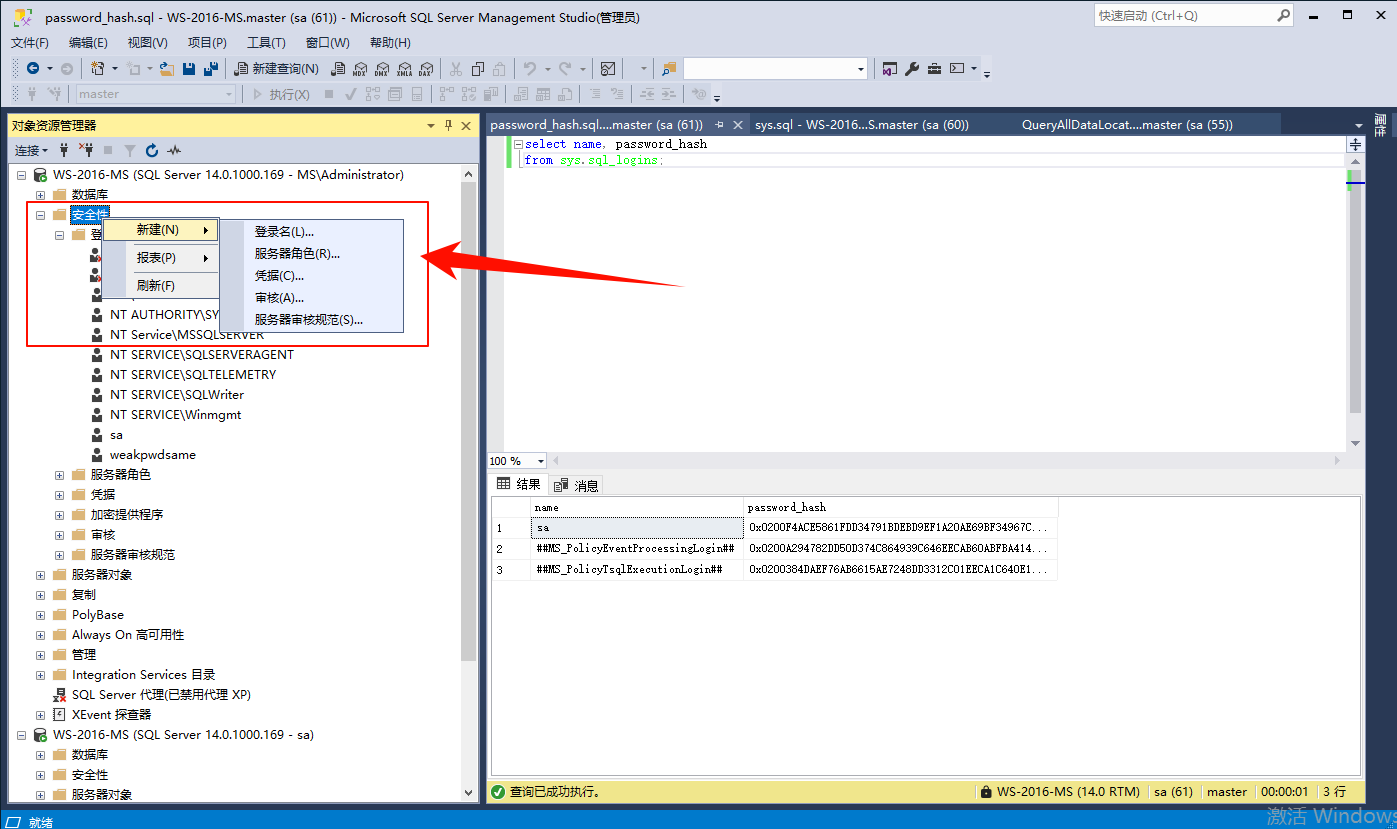
新建登录名
-
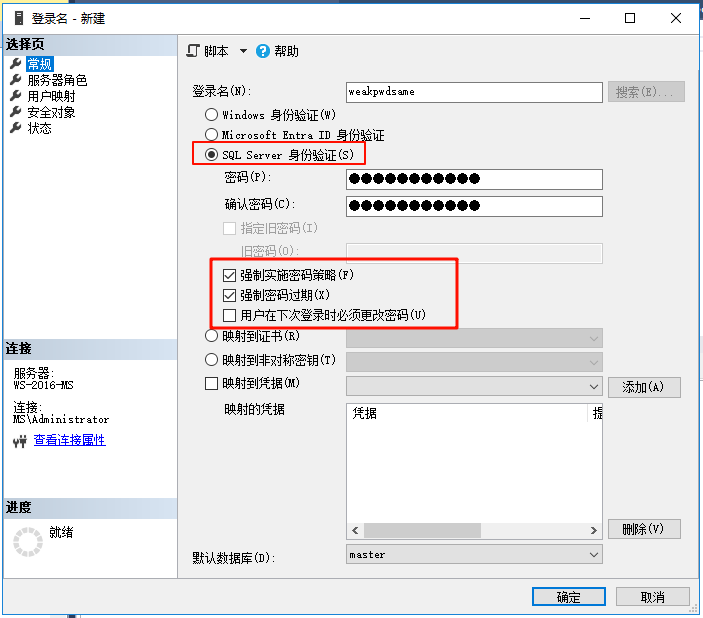
设置登录名、密码和策略
-
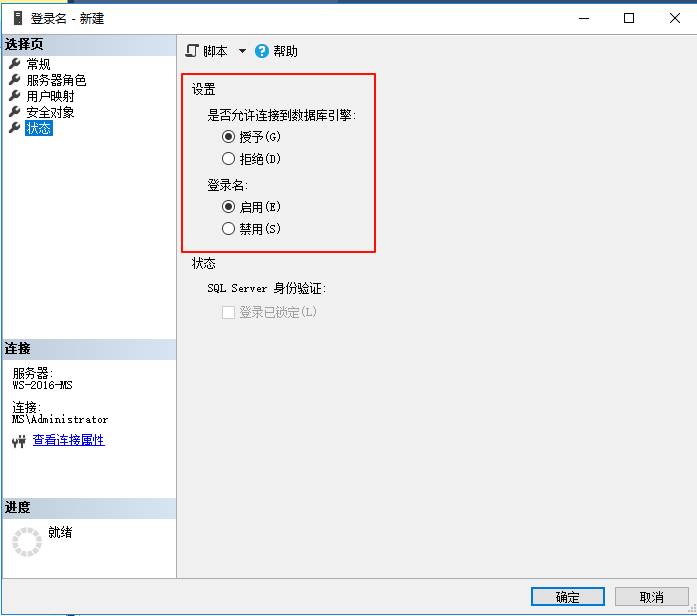
修改状态
hash 计算
参考文章:Calculate MD5 , SHA256, SHA512 in SQL Server
select HASHBYTES('SHA2_512', 'Admin@2022');
开源 Sha512
TokenCore/TokenCore/crypto at ac53b38e6844ffb12deb4f049ad95ef70059273b · xiaotian777888/TokenCore](https://github.com/xiaotian777888/TokenCore/tree/ac53b38e6844ffb12deb4f049ad95ef70059273b/TokenCore/crypto)
使用 Demo
void SHA256_(const uint8_t* input, size_t length,
	uint8_t digest[SHA256_DIGEST_LENGTH])
{
	SHA256CTX context;
	SHA256Init(&context);
	SHA256Update(&context, input, length);
	SHA256Final(&context, digest);
}
使用 C++ 连接 SQLServer
连接字符串
连接字符串:
- 连接字符串语法 - ADO.NET Provider for SQL Server | Microsoft Learn
- ConnectionStrings.com - Forgot that connection string? Get it here!
相关 DLL 和驱动
使用 ODBC 连接 SQLServer 时使用的 DLL 为 odbc32.dll
#define SQLSRV_ODBC_DLL "odbc32.dll"另外还有相关 API 接口调用的 DLL
    if(sql2012)
    {
        driver = "Driver={SQL Server Native Client 11.0};";
        dll = "sqlncli11.dll";
    }
    else if(sql2008)
    {
        driver = "Driver={SQL Server Native Client 10.0};";
        dll = "sqlncli10.dll";
    }
    else if(sql2005)
    {
        driver = "Driver={SQL Native Client};";
        dll = "sqlncli.dll";
    }

    else if(sql2000)
    {
        driver = "Driver={SQL Server};";
        dll = "sqlsrv32.dll";
    }
判断使用哪个驱动和 DLL 接口的 API 参考项目:sqlines
// Define which SQL Server Native Client driver to use
void DefineDriver(std::string &driver, std::string &dll)
{
#if defined(WIN32) || defined(_WIN64)
	HKEY hKey;

	// Keys: SQL Server, SQL Server Native Client 10.0, SQL Server Native Client 11.0
	int rc = RegOpenKeyEx(HKEY_LOCAL_MACHINE, "Software\\ODBC\\ODBCINST.INI", 0, KEY_READ | KEY_ENUMERATE_SUB_KEYS, &hKey);

	if(rc != ERROR_SUCCESS)
		return;

	char key[1024];
	DWORD i = 0;

	bool sql2000 = false;
	bool sql2005 = false;
	bool sql2008 = false;
	bool sql2012 = false;

	bool more = true;

	// Enumerate through all keys
	while(more)
	{
		// Size modified with each call to RegEnumKeyEx
		int size = 1024;

		// Get next key
		rc = RegEnumKeyEx(hKey, i, key, (LPDWORD)&size, NULL, NULL, NULL, NULL);

		if(rc != ERROR_SUCCESS)
		{
			more = false;
			break;
		}

		// SQL Server 2000 driver
		if(strcmp(key, "SQL Server") == 0)
			sql2000 = true;
		else
		// SQL Server 2005 Native client
		if(strcmp(key, "SQL Native Client") == 0)
			sql2005 = true;
		else
		// SQL Server 2008 Native client
		if(strcmp(key, "SQL Server Native Client 10.0") == 0)
			sql2008 = true;
		else
		// SQL Server 2012, 2014 and 2016 Native client
		if(strcmp(key, "SQL Server Native Client 11.0") == 0)
			sql2012 = true;

		i++;
	}

	RegCloseKey(hKey);

	// Return the highest available version (this driver is also used for 2014 and 2016)
	if(sql2012)
	{
		driver = "Driver={SQL Server Native Client 11.0};";
		dll = "sqlncli11.dll";
	}
	else
	if(sql2008)
	{
		driver = "Driver={SQL Server Native Client 10.0};";
		dll = "sqlncli10.dll";
	}
	else
	if(sql2005)
	{
		driver = "Driver={SQL Native Client};";
		dll = "sqlncli.dll";
	}
	else
	if(sql2000)
	{
		driver = "Driver={SQL Server};";
		dll = "sqlsrv32.dll";
	}

#endif
}
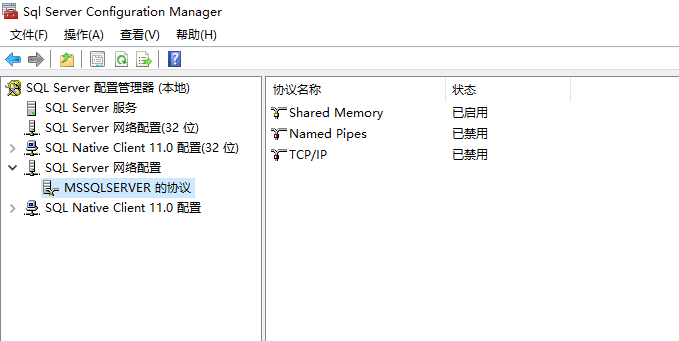
网络协议
switch (Protocol)
{
    case NetworkProtocol.Pipes:
        connectionBuilder.Append("Network=dbnmpntw");
        break;

    case NetworkProtocol.Shared:
        connectionBuilder.Append("Network=dbmslpcn");
        break;

    case NetworkProtocol.Tcp:
        connectionBuilder.Append("Network=dbmssocn");
        break;

    default:
        break;
}
一个基础的 Demo 用于连接 SQLServer
#include <windows.h>
#include <sql.h>
#include <sqlext.h>
#include <iostream>

int main() {
    SQLHENV hEnv = NULL;
    SQLHDBC hDbc = NULL;
    SQLRETURN retcode;

    // Allocate environment handle
    SQLAllocHandle(SQL_HANDLE_ENV, SQL_NULL_HANDLE, &hEnv);
    SQLSetEnvAttr(hEnv, SQL_ATTR_ODBC_VERSION, (SQLPOINTER)SQL_OV_ODBC3, 0);

    // Allocate connection handle
    SQLAllocHandle(SQL_HANDLE_DBC, hEnv, &hDbc);

    // Set up connection string (as a wide string literal)
    // Note: You might need to adjust the connection string based on your setup
    WCHAR connStr[] = L"DRIVER={SQL Server Native Client 10.0};"
                       L"SERVER=myServerAddress;"
                       L"INTEGRATED SECURITY=True;"
                       L"DATABASE=myDatabase;";

    // Connect to SQL Server
    retcode = SQLDriverConnect(hDbc, NULL, connStr, SQL_NTS,
                               NULL, 0, NULL, SQL_DRIVER_NOPROMPT);

    if (retcode == SQL_SUCCESS || retcode == SQL_SUCCESS_WITH_INFO) {
        std::cout << "Connection successful!" << std::endl;
        // Perform database operations here...

    } else {
        std::cerr << "Connection failed." << std::endl;
        // Handle connection error...
    }

    // Disconnect and free up allocated handles
    SQLDisconnect(hDbc);
    SQLFreeHandle(SQL_HANDLE_DBC, hDbc);
    SQLFreeHandle(SQL_HANDLE_ENV, hEnv);

    return 0;
}